Age of Empires 3 PC
Experience Age of Empires 3 PC with epic battles, diverse civilizations, and stunning strategy gameplay. Build, conquer, and rule your empire today!

When it comes to real-time strategy (RTS) games, few titles stand as tall as Age of Empires 3 PC. Released by Ensemble Studios and published by Microsoft, this third entry in the legendary franchise built upon the foundations of its predecessors, offering players a more immersive, polished, and historically rich strategy experience. While Age of Empires has appeared on various platforms, the PC version has always been the definitive way to enjoy it—providing unmatched control, precision, and performance for gamers who thrive on strategy and decision-making.
Unlike traditional action games, Age of Empires 3 PC focuses on the sandbox of empire-building and tactical warfare. Players control a civilization during the colonial era, gathering resources, training armies, and forging alliances while defending against rival powers. The PC version enhances these mechanics with smoother controls, allowing players to execute complex strategies with the precision of a keyboard and mouse. From managing villagers to commanding large armies, every action feels more fluid and intuitive, which is why PC remains the best platform for RTS gameplay.
Age of Empires 3 PC has made a lasting cultural impact. Its vibrant modding community continues to expand the game with custom maps, scenarios, and mods, keeping it alive for decades. The release of the Age of Empires 3: Definitive Edition further solidified its place as a timeless classic for PC gamers. This version brought enhanced graphics, improved audio, and updated gameplay, attracting both veterans and newcomers alike. With millions of players worldwide and an active online community, Age of Empires 3 has become not just a game, but a viral PC phenomenon.

Features
1. Wide Range of Civilizations
Age of Empires 3 PC introduces players to a variety of civilizations, including the British, Spanish, Ottomans, French, and Native American tribes. Each civilization comes with its own unique strengths, units, and bonuses, offering different strategies for players. For example, the British thrive on building manors that generate settlers, while the Ottomans have a steady flow of free settlers from their town centers.
2. The Home City System
One of the game’s standout features is the Home City system, which acts like a support hub that sends reinforcements, resources, and upgrades directly to the battlefield. This adds a layer of depth to the gameplay, as players can customize their shipments and adapt strategies based on the flow of the match.
3. Realistic Colonial Era Warfare
Set during the Age of Exploration and Colonization, the game features musketeers, cavalry, and artillery units that reflect the period. Battles feel authentic, with gunpowder mechanics, fortifications, and naval warfare adding to the realism. Players experience the challenges of commanding armies in the colonial era.
4. Engaging Campaign Mode
The game includes a story-driven single-player campaign that follows the fictional Black family across generations. These missions combine historical context with adventurous storytelling, guiding new players through mechanics while offering exciting narrative battles.
5. Resource Management & Trade
Like all Age of Empires titles, managing resources is crucial. Players must balance food, wood, and coin collection to sustain their empire. Age of Empires 3 PC also adds trade routes, where players can build trading posts to generate income or receive shipments, making economic decisions more strategic.
6. Advanced Graphics & Visuals
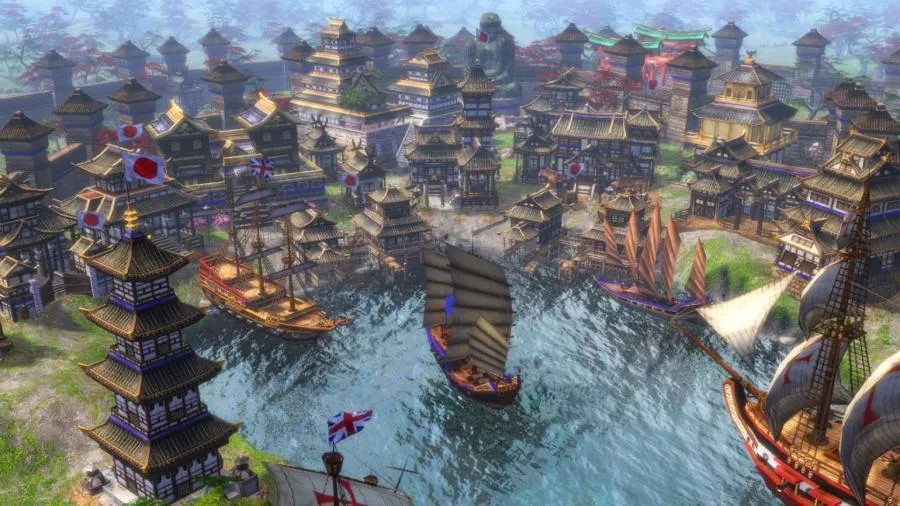
With the Definitive Edition, the game now supports 4K Ultra HD graphics and remastered audio. Landscapes are vibrant, units are detailed, and battles look cinematic. This makes it not only fun to play but also visually stunning for modern PC players.
7. Multiplayer Battles
For competitive gamers, the multiplayer mode allows battles with players worldwide. With matchmaking, ranked ladders, and custom lobbies, the game ensures that both casual players and seasoned strategists can enjoy the thrill of testing their skills against others.
8. Modding & Custom Content
The PC modding community keeps Age of Empires 3 PC fresh and exciting. Players can create or download mods that add new civilizations, units, or custom maps. This extends the game’s lifespan and allows for endless creative possibilities.
9. Naval Warfare & Exploration
Unlike many other RTS games, Age of Empires 3 emphasizes naval battles. Players can build fleets, control seas, and transport armies across water routes. Naval supremacy often decides the fate of colonies, making exploration and sea power vital.
10. Cross-Platform Features & Cloud Saves
Modern players benefit from cross-platform features like cloud saving, allowing them to pick up progress across different PCs. Combined with regular updates from the Definitive Edition, this ensures a smoother, more connected gaming experience.

How to Download Age of Empires 3 on PC?
- Click the Download button on this page to safely get the latest PC build.
- Choose your platform (Windows recommended; Mac/Linux may also be available if listed).
- When prompted, Save the file to an easy location (e.g., Downloads or Desktop).
- If the file is a .zip (or .rar), right-click it and select Extract All… to a new folder.
- Open the extracted folder and double-click
Age of Empires 3 PC.exeto launch. - If Windows SmartScreen appears, click More info → Run anyway (only proceed if you downloaded from the button on this page).
- Optional: right-click the .exe and choose Create shortcut to pin it to Start/Desktop.
- In Options/Settings, set fullscreen/windowed, audio levels, and keybinds (WASD/Arrows).
- For future updates, return to this page and click the Download button again, then replace your old game folder with the new one.
System Requirements
| Component | Minimum Requirements | Recommended Requirements |
|---|---|---|
| OS | Windows 10 (64-bit) | Windows 11 (64-bit) |
| Processor | Intel i3-2105 / AMD Phenom II X4 | Intel i5-3300 / AMD FX-8350 |
| RAM | 8 GB | 16 GB |
| Graphics | NVIDIA GeForce GT 430 / AMD Radeon HD | NVIDIA GTX 770 / AMD Radeon R9 |
| DirectX | Version 11 | Version 12 |
| Storage | 42 GB free space | 42 GB free space |
| Internet | Broadband for multiplayer | Broadband for multiplayer |
How to Play Age of Empires 3 on PC?
Getting into Age of Empires 3 PC is straightforward but requires strategic thinking. Start by choosing your civilization and assigning villagers to collect resources—food, wood, and coin. As you advance through the ages, unlock new buildings, military units, and upgrades to strengthen your empire.
Combat requires both tactics and timing. Position your troops strategically, utilize the terrain, and make use of the Home City shipments to reinforce your armies. With practice, you’ll learn to balance economy and military power to dominate your opponents in both single-player campaigns and online battles.
Why Play Age of Empires 3 on PC?
Playing on PC gives you enhanced graphics, smoother controls, and a larger screen, making the RTS experience more enjoyable. The precision of keyboard and mouse controls provides a competitive edge, especially in multiplayer matches.
Additionally, PC eliminates the worry of battery drain, overheating, or performance issues that come with mobile or console play. With cloud saves and mod support, the PC version is the ultimate way to experience Age of Empires 3.
FAQs
Is Age of Empires 3 available on PC?
Yes, Age of Empires 3 was originally released for PC and remains the definitive platform, especially with the Definitive Edition available on Steam and Microsoft Store.
Can I download Age of Empires 3 for PC for free?
While the official version is paid, discounts and bundle offers are often available on Steam or the Microsoft Store. Free trials may also be offered during special promotions.
What makes Age of Empires 3 different from Age of Empires 2?
Age of Empires 3 focuses on the colonial era, introducing features like the Home City system, trade routes, and gunpowder warfare, setting it apart from the medieval style of Age of Empires 2.
Can I play Age of Empires 3 on a low-end PC?
Yes, but you’ll need to lower the graphical settings. The Definitive Edition is optimized, but meeting minimum requirements is essential for smooth gameplay.
Does Age of Empires 3 support multiplayer?
Absolutely. The game features online multiplayer with matchmaking, ranked ladders, and custom lobbies, making it a great way to compete with friends or global players
Conclusion
Age of Empires 3 PC is a timeless real-time strategy masterpiece, offering depth, excitement, and historical immersion. Whether you’re a long-time RTS fan or a newcomer eager to try strategy gaming, this title provides endless hours of fun. Don’t wait click the download button on this page and start building your empire today!