Stumble Guys PC
Play Stumble Guys PC for free! Enjoy hilarious obstacle battles, smooth controls, and stunning graphics. Download now and join the ultimate fun chaos!
If you’ve ever wanted to dive into a chaotic, laugh-out-loud multiplayer experience, Stumble Guys PC is your golden ticket. Originally launched for mobile devices, this wildly entertaining online party game from Kitka Games has stormed the gaming world, drawing millions of players into its slapstick obstacle courses and colorful mayhem. Imagine Fall Guys with a twist that’s Stumble Guys, where your mission is simple yet hilariously tricky: run, jump, and dodge obstacles to become the last one standing!
What started as a fun mobile diversion has now evolved into a PC gaming sensation. With its expanding fanbase, streamers and content creators are flocking to the Stumble Guys PC version, celebrating its improved graphics, smoother performance, and easier controls. The PC version opens the door for gamers who prefer a larger screen, precise movements, and uninterrupted fun without worrying about mobile lag or battery drain.
Whether you’re a casual gamer looking for laughs or a competitive player climbing the knockout ranks, you’ll love how easy it is to download Stumble Guys for PC and join millions of players in the ultimate stumbling showdown. So, ready to jump into the chaos? Let’s explore why this game is worth every click of your keyboard.
Features
Thrilling Multiplayer Knockout Gameplay
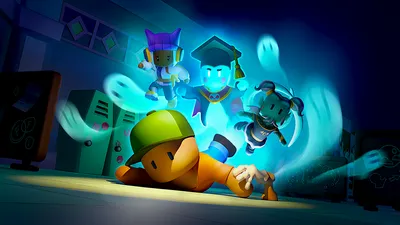
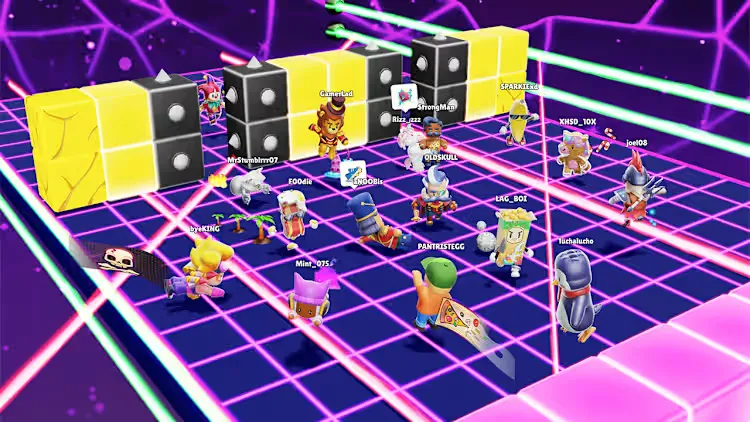
Stumble Guys PC offers exhilarating real-time multiplayer battles with up to 32 players per match. Every game is a race through absurd obstacle courses filled with moving platforms, slippery surfaces, and bouncing traps. The goal? Stay on your feet and make it to the finish line easier said than done! Each round eliminates a few players, building tension until only one “Stumbler” claims victory.
Enhanced Graphics and Smoother Performance
The PC version shines with upgraded visuals and optimized performance. Expect HD textures, better lighting, and fluid animations that make every tumble and victory celebration more immersive. The game runs seamlessly even on mid-range computers, making Stumble Guys on PC a visual treat without performance drops.
Simple Yet Precise Controls
On mobile, touch controls can sometimes feel limiting. But on Stumble Guys PC, you can enjoy responsive keyboard and mouse inputs for superior accuracy. This makes dodging hammers, jumping over gaps, and sliding through finish lines more controlled and more satisfying.
Massive Variety of Maps and Levels
No two rounds feel the same. With dozens of uniquely designed maps, Stumble Guys challenges you with icy slides, swinging pendulums, rotating wheels, and treacherous traps. Regular updates add new levels that keep the gameplay fresh and unpredictable.
Funny and Customizable Characters
Bring your personality into the game! Players can choose from hundreds of quirky costumes, skins, and emotes. Whether you’re a ninja, clown, superhero, or pirate, Stumble Guys PC lets you express your humor and creativity as you stumble toward victory.
Party Mode for Friends
Gaming is always better with friends. With Party Mode, you can create private lobbies and invite your squad to join the madness. Compete, laugh, and brag about your epic wins or hilarious falls in real time.
Cross-Platform Progression
One of the most convenient features is cross-platform support. You can link your account between mobile and PC, allowing you to sync progress, skins, and achievements effortlessly no need to start over!
Frequent Updates and Special Events
Kitka Games constantly introduces seasonal events, limited-time skins, and special challenges. This ensures the game never feels repetitive and always has something new for both casual players and veterans.
Community and Online Competitions
Join millions of global players in community tournaments and ranked matches. Compete for leaderboard glory or just play for fun Stumble Guys PC welcomes everyone, from casual gamers to competitive streamers.
Free-to-Play Fun Without Annoying Ads
Best of all, Stumble Guys PC version is free to download and play. Unlike mobile versions, there are no intrusive ads to interrupt your experience. Just pure, uninterrupted chaos and laughter from start to finish.
How to Download Stumble Guys on PC?
- Click the Download button on this page to safely get the latest PC build.
- Choose your platform (Windows recommended; Mac/Linux may also be available if listed).
- When prompted, Save the file to an easy location (e.g., Downloads or Desktop).
- If the file is a .zip (or .rar), right-click it and select Extract All… to a new folder.
- Open the extracted folder and double-click
Stumble Guys PC.exeto launch. - If Windows SmartScreen appears, click More info → Run anyway (only proceed if you downloaded from the button on this page).
- Optional: right-click the .exe and choose Create shortcut to pin it to Start/Desktop.
- In Options/Settings, set fullscreen/windowed, audio levels, and keybinds (WASD/Arrows).
System Requirements
| Specification | Minimum Requirements | Recommended Requirements |
|---|---|---|
| OS | Windows 7/8/10 (64-bit) | Windows 10/11 (64-bit) |
| Processor | Intel Core i3 or equivalent | Intel Core i5 or higher |
| RAM | 4 GB | 8 GB |
| Graphics | Intel HD Graphics 4000 | NVIDIA GTX 750 / AMD Radeon RX 550 |
| Storage | 2 GB free space | 4 GB free space |
| Internet | Broadband connection required | Stable high-speed connection |
How to Play Stumble Guys on PC?
Once you’ve installed the Stumble Guys PC version, you’re ready to jump into a world of hilarious chaos and nonstop competition. The controls are simple but effective use the keyboard for movement (W, A, S, D), the spacebar to jump, and your mouse to navigate menus. As you enter a match, you’ll find yourself racing through colorful obstacle courses filled with spinning hammers, slippery slides, and moving platforms. Your mission? Stay upright, stay fast, and avoid falling off!
Each round in Stumble Guys on PC eliminates a few players until one champion remains. Quick reflexes and timing are essential to survive, but don’t forget the fun half the joy comes from laughing at the chaos. You can join public matches, invite friends through party codes, or compete in seasonal tournaments. Every stumble is a new opportunity to improve your skills, unlock cool skins, and climb the ranks toward ultimate victory.
Why Play Stumble Guys on PC?
Playing Stumble Guys PC offers an upgraded experience that mobile simply can’t match. With enhanced graphics, faster performance, and smoother gameplay, you’ll enjoy every tumble in crisp HD. The keyboard and mouse controls give you precise movements, making it easier to jump, dodge, and sprint through every round without frustration.
Moreover, playing on PC eliminates battery drain and overheating issues common on mobile devices. You can multitask effortlessly stream your matches, chat with friends, or record highlights all while enjoying a larger screen and immersive sound. With cross-platform progress syncing, you can switch between your phone and PC without losing achievements or skins. Simply put, Stumble Guys on computer delivers the ultimate blend of comfort, control, and chaos that every gamer deserves.
FAQs
Is Stumble Guys free to play on PC?
Yes, Stumble Guys PC is completely free to download and play. You can get it safely from official platforms like Steam or Epic Games Store, or by clicking the download button provided in this article. While the game is free, it does offer optional in-game purchases such as costumes, emotes, and skins for players who want to customize their avatars. The free version includes full gameplay access with all maps, levels, and events available to enjoy.
Can I play Stumble Guys on my laptop or low-end PC?
Absolutely! One of the best things about Stumble Guys PC is that it’s lightweight and optimized to run smoothly even on mid- or low-spec computers. As long as your system meets the minimum requirements (4 GB RAM, Intel Core i3, and integrated graphics), you’ll enjoy a stable performance. For an even smoother experience, closing background apps and updating your graphics drivers can help boost frame rates.
How do I play with friends in Stumble Guys on PC?
Playing with friends is easy and one of the game’s most enjoyable features. After launching the Stumble Guys PC version, simply select “Party Mode” from the main menu. Create a private room to generate a code, then share that code with your friends so they can join your lobby. Once everyone’s in, start the match and enjoy the laughter-filled chaos together. This feature supports cross-platform play, so mobile and PC players can compete in the same match.
Is there a difference between the mobile and PC versions?
Yes, the PC version of Stumble Guys provides several advantages. It delivers higher-quality graphics, smoother frame rates, and no intrusive ads compared to mobile. Plus, PC players benefit from keyboard and mouse controls for more precise movement and better control during obstacle courses. Despite these differences, both versions share the same maps, skins, and events ensuring everyone enjoys the same exciting content.
Can I sync my progress between mobile and PC?
Definitely! Kitka Games has made cross-platform syncing simple and convenient. Just log in to your existing account when you launch Stumble Guys on PC, and all your progress including skins, crowns, and stats will automatically sync. This allows you to switch between devices seamlessly and continue your journey without losing any achievements.
Conclusion
Stumble Guys PC is more than just a game it’s a hilarious, fast-paced adventure filled with laughter, competition, and endless fun. With smoother controls, improved visuals, and cross-platform access, it’s the perfect way to enjoy your favorite obstacle royale on a bigger screen. Don’t wait click the Download Now button below to join millions of players and start stumbling your way to victory today!