Bloons TD 6 PC
Defend, strategize, and pop endless waves of bloons in Bloons TD 6 PC! Enjoy stunning 3D graphics, hero monkeys, and epic tower defense fun on your computer.

Bloons TD 6 PC is the ultimate tower defense game that has captured the hearts of millions of gamers around the world. Developed by Ninja Kiwi, this colorful and fast-paced strategy title brings together the perfect mix of creativity, chaos, and precision. With over 10 million downloads on various platforms, Bloons TD 6 stands as one of the most loved strategy games ever made.
In this game, players deploy an army of monkey towers armed with unique abilities to pop endless waves of balloons or “bloons.” The gameplay may sound simple, but it’s packed with deep strategy, upgrades, and a variety of heroes that keep every match fresh and challenging. Whether you’re a casual gamer or a hardcore strategist, Bloons TD 6 PC offers the perfect platform to test your tactical genius.
If you’ve been playing on mobile and want an enhanced experience, the Bloons TD 6 PC version is the way to go. You’ll enjoy high-resolution graphics, seamless controls, and smooth performance on your computer. Don’t wait click the download button on this page to download Bloons TD 6 for PC and join the balloon-popping fun today!

Features
Beautiful 3D Visuals and Enhanced Graphics
The Bloons TD 6 PC version takes tower defense gaming to the next level with stunning 3D visuals. Every map bursts with vibrant colors, lively animations, and dynamic lighting effects that bring your monkey army and the invading bloons to life. Playing on a computer allows for higher resolutions and smoother frame rates, creating a visually immersive experience that mobile devices simply can’t match.
Over 23 Unique Monkey Towers
In Bloons TD 6, strategy revolves around its wide selection of monkey towers. Each of the 23 towers offers distinct attack styles and abilities from Dart Monkeys that start your defense to Super Monkeys capable of annihilating waves of bloons. Every tower has three upgrade paths, allowing you to customize and combine towers for maximum efficiency.
Hero Monkeys with Special Powers
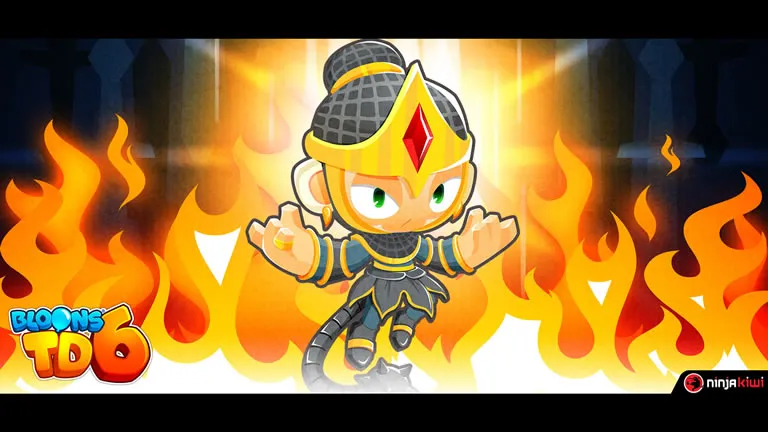
Hero Monkeys are powerful, one-of-a-kind units that level up automatically as the game progresses. Heroes such as Quincy, Adora, and Benjamin come with unique abilities that can drastically change your defensive approach. Choosing the right hero for your map and strategy adds another layer of tactical depth to every battle.
Deep and Strategic Upgrade System
Bloons TD 6 PC features a comprehensive upgrade tree that lets you enhance your towers with new attacks, range boosts, and special effects. You can mix and match different upgrade paths to experiment with new combinations. The right upgrade strategy can make the difference between victory and defeat.
Massive Selection of Maps
The game includes over 60 handcrafted maps, each designed with unique challenges and layouts. Some maps feature multiple tracks or tricky obstacles that test your strategic placement skills. From beginner-friendly fields to complex advanced maps, there’s always a new challenge waiting.
Engaging Co-op Multiplayer Mode
Team up with your friends in 4-player co-op multiplayer to defend against waves of bloons together. Cooperation, timing, and resource sharing are key to success. Whether you’re coordinating defenses or helping a struggling teammate, multiplayer mode adds fun and social excitement to the game.
Offline Play for Anytime Gaming
Don’t have an internet connection? No problem. Bloons TD 6 on PC allows you to play offline in single-player mode. This feature is perfect for travel or when you simply want to relax and enjoy some tower defense fun without being online.
Endless and Challenge Modes
For players who crave non-stop action, the Endless Mode offers unlimited rounds to see how long you can survive. Additionally, daily and weekly challenges provide special scenarios that test your creativity and adaptability, ensuring the gameplay never gets repetitive.
Regular Updates and Community Support
The developers at Ninja Kiwi frequently roll out updates introducing new heroes, towers, maps, and balance tweaks. The active community and responsive developers keep the game alive with fresh content, making every update feel like a new adventure.
Cross-Platform Progress and Cloud Saves
With the Ninja Kiwi account system, you can easily sync your progress between mobile and PC. That means you can start a game on your phone and continue exactly where you left off on your computer. The cross-platform compatibility ensures your hard-earned progress and upgrades are always safe and accessible.
How to Download Bloons TD 6 on PC?
- Click the Download button on this page to safely get the latest PC build.
- Choose your platform (Windows recommended; Mac/Linux may also be available if listed).
- When prompted, Save the file to an easy location (e.g., Downloads or Desktop).
- If the file is a .zip (or .rar), right-click it and select Extract All… to a new folder.
- Open the extracted folder and double-click
Bloons TD 6 PC.exeto launch. - If Windows SmartScreen appears, click More info → Run anyway (only proceed if you downloaded from the button on this page).
- Optional: right-click the .exe and choose Create shortcut to pin it to Start/Desktop.
- In Options/Settings, set fullscreen/windowed, audio levels, and keybinds (WASD/Arrows).
- For future updates, return to this page and click the Download button again, then replace your old game folder with the new one.
System Requirements
| Specification | Minimum Requirements | Recommended Requirements |
|---|---|---|
| OS | Windows 7 (64-bit) | Windows 10 / 11 (64-bit) |
| Processor | Intel Core i3 or AMD equivalent | Intel Core i5 / Ryzen 5 or better |
| RAM | 4 GB | 8 GB |
| Graphics | Intel HD 4000 or equivalent | NVIDIA GTX 960 / AMD Radeon R9 280 |
| Storage | 2 GB free space | 3 GB free space |
| DirectX | Version 11 | Version 12 |
| Internet | Optional (for multiplayer) | Broadband connection recommended |
How to Play Bloons TD 6 on PC?
Playing Bloons TD 6 on PC is a mix of strategy, timing, and creative thinking. Once you launch the game, select your preferred map and difficulty level. The objective is simple yet thrilling stop the colorful waves of bloons from escaping by strategically placing monkey towers along their path. Each tower has unique strengths, attack styles, and upgrade paths, so balancing offense and defense is key. As you progress, you’ll earn in-game currency to upgrade your towers, unlock new abilities, and summon powerful hero monkeys to strengthen your defenses.
Using your mouse and keyboard makes gameplay smoother and more precise compared to mobile. You can easily drag and drop towers, activate abilities, and upgrade units with quick clicks. Experiment with different tower combinations and strategies to tackle various bloon types from camo bloons to massive MOABs. Whether you prefer a relaxed sandbox session or a competitive endless challenge, Bloons TD 6 PC gives you the control and flexibility to master your defense style.

Why Play Bloons TD 6 on PC?
Choosing the Bloons TD 6 PC version offers multiple advantages that make the gameplay experience far superior to mobile. You’ll enjoy enhanced 3D graphics, faster loading times, and smooth performance on a larger screen making every explosion and upgrade look stunning. With keyboard and mouse controls, managing towers, heroes, and upgrades feels more precise and efficient, giving players an edge during intense rounds.
Beyond visuals and control, playing on PC means no battery drain, uninterrupted sessions, and the ability to multitask between other programs. The cross-platform progress syncing feature ensures that you can switch between devices without losing your achievements. Overall, Bloons TD 6 on PC provides the ultimate combination of performance, comfort, and convenience perfect for both casual and competitive tower defense fans.
FAQs
Is Bloons TD 6 free on PC?
No, Bloons TD 6 is a premium game, but it often goes on sale on Steam or Microsoft Store. The one-time purchase grants full access with no hidden microtransactions.
Can I play Bloons TD 6 offline on PC?
Yes! One of the best features of Bloons TD 6 PC is its offline mode. You can enjoy single-player gameplay without needing an internet connection.
Does Bloons TD 6 support cross-platform progress?
Absolutely. By linking your Ninja Kiwi account, you can sync your progress across PC, iOS, and Android devices seamlessly.
What’s new in the latest update for Bloons TD 6?
Ninja Kiwi regularly adds new towers, maps, and balance tweaks. Recent updates introduced new heroes and community-designed maps that expand replayability.
Can I play Bloons TD 6 PC with friends?
Yes, Bloons TD 6 supports co-op multiplayer, allowing you to team up with up to four players and tackle the toughest maps together.
Conclusion
Bloons TD 6 PC delivers the perfect blend of strategy, fun, and replayability for gamers of all levels. With its crisp 3D visuals, deep upgrade system, and smooth PC performance, it’s no wonder this title remains one of the best tower defense games in the world. Ready to join the fun? Click the download button on this page to get Bloons TD 6 for PC and start building your unbeatable monkey army today!