PUBG PC
Experience the ultimate Battle Royale with PUBG PC. Enjoy realistic gameplay, stunning graphics, and fast-paced action. Download PUBG for PC today!
Few games have changed the gaming landscape like PUBG PC, officially known as Player Unknown’s Battlegrounds. Developed by PUBG Corporation, a subsidiary of KRAFTON Inc., this Battle Royale title set the benchmark for survival-based competitive gameplay. Since its debut in 2017, PUBG on PC has attracted millions of players worldwide, blending adrenaline-pumping action with tactical strategy.
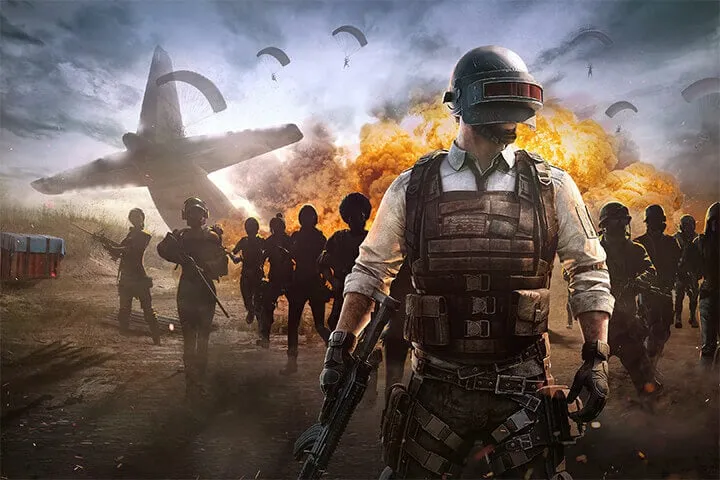
What makes PUBG PC version so special is its thrilling concept 100 players parachute onto a massive island, scavenging for weapons, vehicles, and resources while fighting to be the last one standing. Its realistic combat, immersive maps like Erangel and Miramar, and unpredictable encounters have kept players hooked for years. The PC version, in particular, offers crisp graphics, smooth gameplay, and unmatched precision for those seeking the ultimate experience.
Whether you’re a newcomer or a veteran gamer, playing PUBG on computer gives you the competitive edge with better visuals, faster response times, and customizable settings. Ready to dive in? Scroll below and click the download button on this page to download PUBG for PC safely and start your journey to victory.
Features
Realistic Battle Royale Gameplay
PUBG PC delivers an authentic Battle Royale experience that revolutionized modern gaming. One hundred players are dropped onto a vast island with nothing but their wits. The goal? Be the last survivor. The tension of scavenging for weapons, managing health, and outsmarting enemies creates a thrilling, unpredictable experience every time you play.
High-Definition Graphics and Immersive Environments
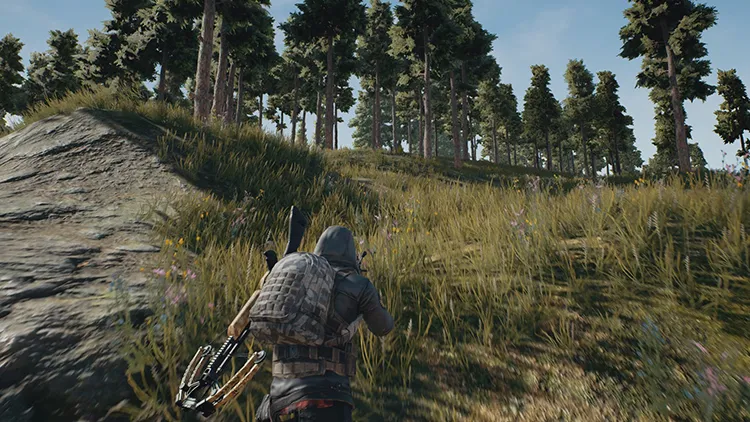
Powered by Unreal Engine 4, PUBG PC version brings lifelike environments, detailed textures, and realistic lighting effects to your screen. Whether you’re sneaking through the fields of Erangel or battling across the deserts of Miramar, every scene feels cinematic. PC players can tweak resolution and frame rates for optimal performance or stunning realism.
Expansive and Varied Maps
PUBG offers multiple maps Erangel, Miramar, Sanhok, Vikendi, and Taego each with its own challenges. Erangel’s balanced terrain is ideal for tactical combat, while Sanhok’s dense jungles encourage close-quarter battles. These maps aren’t just backdrops; they shape your strategies, vehicle choices, and survival tactics.
Massive Arsenal of Weapons and Gear
Every gunfight in PUBG on PC is unique thanks to its diverse weapon collection. Players can choose from assault rifles, sniper rifles, SMGs, and shotguns each with realistic recoil and sound design. Attachments like scopes, grips, and suppressors further enhance precision and customization, allowing you to tailor your loadout to your playstyle.
Dynamic Weather and Day-Night Cycles
The PC version includes dynamic weather systems that impact gameplay. A sudden fog can limit visibility, while rain muffles footsteps perfect for stealth tactics. Some maps even feature day-night transitions, adding another layer of realism and strategy to every match.
Vehicle Combat and Exploration
Vehicles are more than transportation they’re lifelines and weapons in disguise. Drive cars, motorbikes, boats, or even armored trucks to traverse vast terrains quickly or escape the shrinking play zone. Skilled players can use vehicles strategically for ambushes or high-speed escapes, turning ordinary chases into epic moments.
Multiple Game Modes for Every Playstyle
PUBG PC caters to all types of players. Go solo for an intense survival challenge, duo with a friend for cooperative tactics, or squad up with a team for strategic dominance. Each mode rewards different skills, from communication to individual reflexes.
Realistic Physics and Combat Mechanics
One of PUBG’s standout features is its realistic ballistics system. Bullets drop over distance, and recoil patterns differ by weapon. Learning these mechanics gives PC players a real edge, especially with the precision of mouse and keyboard controls.
Frequent Updates and Seasonal Content
PUBG remains fresh thanks to regular updates from KRAFTON. New maps, weapons, skins, and seasonal events keep players engaged year-round. The evolving meta ensures that no two seasons ever feel the same.
Esports and Competitive Play
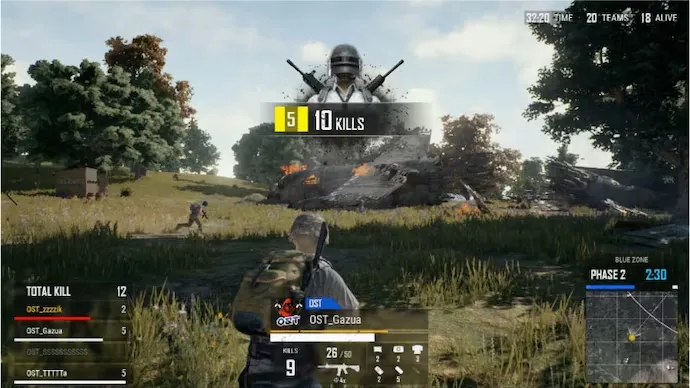
Finally, PUBG PC is the home of professional-level Battle Royale. Its stable servers, low latency, and customizable controls make it the go-to platform for Esports tournaments worldwide. Players can join ranked matches to test their skills or watch global pros in official PUBG championships.
How to Download PUBG on PC?
- Click the Download button on this page to safely get the latest PC build.
- Choose your platform (Windows recommended; Mac/Linux may also be available if listed).
- When prompted, Save the file to an easy location (e.g., Downloads or Desktop).
- If the file is a .zip (or .rar), right-click it and select Extract All… to a new folder.
- Open the extracted folder and double-click
PUBG PC.exeto launch. - If Windows SmartScreen appears, click More info → Run anyway (only proceed if you downloaded from the button on this page).
- Optional: right-click the .exe and choose Create shortcut to pin it to Start/Desktop.
- In Options/Settings, set fullscreen/windowed, audio levels, and keybinds (WASD/Arrows).
System Requirements
| Category | Minimum Requirements | Recommended Requirements |
|---|---|---|
| OS | Windows 10 (64-bit) | Windows 11 (64-bit) |
| Processor | Intel Core i5-4430 / AMD FX-6300 | Intel Core i5-6600K / AMD Ryzen 5 1600 |
| Memory (RAM) | 8 GB | 16 GB |
| Graphics | NVIDIA GeForce GTX 960 / AMD R7 370 | NVIDIA GeForce GTX 1060 / AMD Radeon RX 580 |
| DirectX | Version 11 | Version 12 |
| Storage | 40 GB available space | SSD recommended |
| Network | Broadband Internet connection | Stable high-speed connection |
| Sound Card | DirectX-compatible | DirectX-compatible |
How to Play PUBG on PC?
Playing PUBG on PC is all about mastering survival, precision, and strategy. Once you launch the game, you’ll begin in the lobby, where you can customize your character, adjust settings, and join solo, duo, or squad matches. Each round starts with you parachuting from a plane onto a massive island. Choose your landing spot wisely near buildings for loot or in remote areas for a safer start. After landing, your main goal is to scavenge weapons, armor, and healing items while staying inside the shrinking safe zone.
Combat in PUBG PC version demands sharp reflexes and tactical awareness. Use cover, crouch or prone for stability, and utilize your surroundings for advantage. Communication is key in squad mode — coordinate with your teammates to flank enemies or secure objectives. Learn recoil control, vehicle handling, and map awareness to survive longer. With consistent practice and smart positioning, you’ll quickly evolve from a beginner to a Battle Royale champion.
Why Play PUBG on PC?
There are several compelling reasons to play PUBG on PC. The most obvious is performance PC hardware delivers enhanced graphics, smoother frame rates, and precise keyboard and mouse controls that give you an edge in aiming and reaction time. The gameplay feels more immersive on a larger screen, with rich sound details and realistic visuals.
Moreover, playing PUBG on computer eliminates mobile-related issues such as battery drain, lag, or overheating. PC players also enjoy multitasking options like streaming, voice chat, or browsing while in the lobby. Thanks to cross-platform progress syncing through your KRAFTON account, you can switch devices without losing achievements or skins. For gamers seeking the most polished and competitive version of the game, PUBG PC stands as the ultimate platform.
FAQs
Is PUBG PC free to play?
Yes, PUBG: Battlegrounds PC became free-to-play in early 2022. However, certain premium items, skins, and the Battlegrounds Plus upgrade require payment for access to ranked mode and advanced customization.
Can I play PUBG on a low-end computer?
You can run the game on mid-range systems by lowering graphics settings. For smoother gameplay, use Performance Mode, disable shadows, and close background apps. However, an SSD and a dedicated GPU are highly recommended.
What’s the difference between PUBG PC and PUBG Mobile?
The PC version offers superior graphics, larger lobbies, and realistic weapon physics. It’s designed for competitive play using keyboard and mouse, whereas PUBG Mobile simplifies controls for touchscreen devices.
Is PUBG PC available on Steam?
Absolutely. You can download PUBG for PC directly from Steam. Just search for PUBG: Battlegrounds and click “Play Game.” Steam also manages automatic updates and ensures your game files remain secure.
Can I play with friends on other platforms?
Cross-play between PC and consoles (PlayStation, Xbox) is supported, but not with mobile devices. Your KRAFTON account enables cross-progression, so your cosmetics and achievements sync across platforms.
Conclusion
PUBG PC remains the ultimate Battle Royale experience for gamers seeking thrilling combat, stunning visuals, and competitive gameplay. With its vast maps, realistic physics, and continuous updates, it offers endless excitement and strategic depth. Whether you’re playing solo or with friends, every match delivers heart-pounding action and unforgettable moments. Enjoy enhanced graphics, precise controls, and smooth performance all optimized for PC. Don’t wait any longer! Click the download button below to safely download PUBG for PC today and join millions of players in the fight for survival and glory.