Dying Light 2 PC
Survive the apocalypse in Dying Light 2 PC with parkour, combat, and choices shaping Villedor. Download now for the ultimate horror experience.

Dying Light 2 PC is not just another survival horror game it’s a groundbreaking open-world experience that expands upon the original’s acclaimed parkour mechanics and intense zombie survival gameplay. While console players get their share of action, the PC version remains the definitive platform. The freedom to explore Villedor in high-resolution detail, customize settings, and enjoy seamless performance makes playing on PC the most immersive way to experience the apocalyptic chaos.
At its heart, Dying Light 2: Stay Human thrives on dynamic sandbox mechanics. Players can climb skyscrapers, leap across rooftops, and engage in fast-paced combat all while making crucial narrative choices that alter the fate of the city. On PC, these mechanics shine brighter with enhanced physics, higher frame rates, and customizable controls. Whether you’re crafting weapons, sneaking past nightmarish Infected, or forging alliances, the PC version offers the smoothest, most customizable survival horror experience.
Since its release, Dying Light 2 has built a passionate global community, particularly strong on PC due to mods and fan-made content. From graphic overhauls to gameplay tweaks, the modding scene extends the game’s life and creative potential. With millions of players sharing parkour tricks, survival strategies, and custom mods, Dying Light 2 PC has solidified itself as a viral phenomenon in the gaming world cementing Techland’s reputation for creating one of the most replayable survival horror sagas ever.

Features
Vast Open-World Exploration
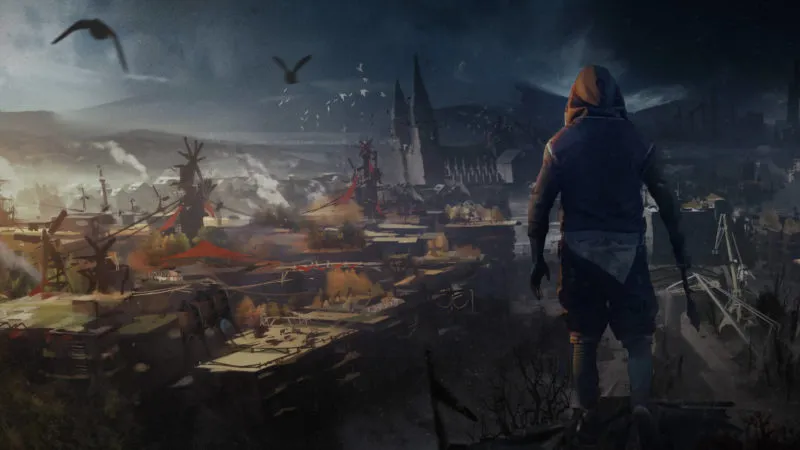
The city of Villedor is a massive post-apocalyptic landscape filled with crumbling skyscrapers, underground tunnels, and survivor settlements. On PC, players can fully appreciate the scale of the environment with enhanced graphics and smooth rendering, making exploration both visually rewarding and strategically important.
Parkour and Free Movement System
Movement is the soul of Dying Light 2: Stay Human, and its parkour mechanics set it apart. From wall-running and vaulting obstacles to using a paraglider, players have unmatched freedom to navigate the city. The fluidity of movement combined with keyboard and mouse precision on PC creates a thrilling traversal experience.
Branching Storyline and Choices
Your decisions shape the future of Villedor. Aligning with different factions unlocks unique quests, alters the city’s infrastructure, and impacts survivor lives. This branching narrative ensures that no two playthroughs are the same, giving PC gamers multiple reasons to replay and explore alternate paths.
Dynamic Day and Night Cycle
The world transforms dramatically depending on the time of day. During the day, humans reclaim the streets, but at night, terrifying Infected dominate. Nighttime brings increased risk but also greater rewards. With PC’s advanced lighting and ray tracing, this cycle becomes more atmospheric and immersive.
Intense Combat Mechanics
Combat in Dying Light 2 blends visceral melee action with strategic weapon use. Players can craft brutal weapons, dismember zombies, and outmaneuver enemies using parkour mid-battle. PC performance enhances this with smoother frame rates and responsive controls, ensuring combat feels fast and satisfying.
Weapon Crafting and Customization
Scavenging is vital to survival. From collecting scraps and chemicals to building electrified machetes, crafting lets you tailor weapons to your playstyle. On PC, quick crafting menus and modding support give players even more control over their arsenal.
Multiplayer and Co-Op Gameplay
The game allows up to four players to join forces online. Whether tackling missions, exploring rooftops, or surviving nighttime hordes, co-op brings a new level of excitement. With PC’s stable servers and communication tools, teamwork is smoother and more engaging.
Realistic Survival Elements
Survival is not just about fighting zombies it’s also about managing stamina, resources, and safe zones. Limited supplies force players to strategize, while realistic stamina mechanics make parkour and combat more challenging. PC players can fine-tune difficulty settings to match their survival style.
Stunning Visuals and Next-Gen Performance
On PC, Dying Light 2 supports 4K resolution, ultra-graphics settings, and ray tracing. Combined with a powerful GPU, players experience breathtaking cityscapes, realistic shadows, and lifelike textures that amplify immersion in the horror-filled world.
Expansions, Updates, and Mods
Techland continues to update Dying Light 2 with patches, events, and expansions. The PC platform also opens doors to a thriving modding community, extending the game’s longevity with custom content, graphical improvements, and new gameplay features created by fans.
How to Download Dying Light 2 on PC?
- Click the Download button on this page to safely get the latest PC build.
- Choose your platform (Windows recommended; Mac/Linux may also be available if listed).
- When prompted, Save the file to an easy location (e.g., Downloads or Desktop).
- If the file is a .zip (or .rar), right-click it and select Extract All… to a new folder.
- Open the extracted folder and double-click
Dying Light 2 PC.exeto launch. - If Windows SmartScreen appears, click More info → Run anyway (only proceed if you downloaded from the button on this page).
- Optional: right-click the .exe and choose Create shortcut to pin it to Start/Desktop.
- In Options/Settings, set fullscreen/windowed, audio levels, and keybinds (WASD/Arrows).
- For future updates, return to this page and click the Download button again, then replace your old game folder with the new one.
System Requirements
| Specification | Minimum Requirements | Recommended Requirements |
|---|---|---|
| OS | Windows 10 (64-bit) | Windows 10/11 (64-bit) |
| Processor | Intel Core i5-8400 / Ryzen 3 2300X | Intel Core i5-8600K / Ryzen 5 3600X |
| Memory (RAM) | 8 GB | 16 GB |
| Graphics | NVIDIA GTX 1050 Ti / AMD RX 560 | NVIDIA RTX 2060 / AMD RX Vega 56 |
| DirectX | Version 12 | Version 12 |
| Storage | 60 GB available space | 60 GB SSD (Recommended) |
How to Play Dying Light 2 on PC?
Playing Dying Light 2 PC is about mastering survival mechanics while enjoying freedom of exploration. Once installed, begin your adventure by adjusting the game’s graphical settings to match your system’s performance. Configure mouse sensitivity, keybindings, and audio for maximum immersion.
As you progress, focus on combining parkour with combat to outmaneuver enemies. Complete missions, side quests, and faction challenges to gain resources and level up. Remember: nighttime exploration is dangerous but offers greater rewards. With patience and skill, you’ll survive and thrive in this unforgiving world.
Why Play Dying Light 2 on PC?
One of the biggest reasons to play Dying Light 2 on PC is the sheer performance advantage. The game looks stunning in 4K with ray tracing enabled, and the fluidity of keyboard and mouse controls makes parkour and combat more precise.
Additionally, PC gaming eliminates common limitations like battery drain or overheating from consoles. With modding, multitasking, and cross-platform progress syncing, the PC version gives you the ultimate survival horror experience on a bigger screen with better controls.
FAQs
Can I run Dying Light 2 on a low-end PC?
Yes, but you’ll need to adjust settings to low and possibly disable advanced features like ray tracing for smoother performance.
Does Dying Light 2 PC support mods?
Absolutely. The PC community has created many mods, from visual enhancements to new gameplay mechanics, extending the game’s replay value.
Is Dying Light 2 cross-platform between PC and consoles?
Currently, Dying Light 2 does not support full cross-platform play, but progress syncing is supported across some platforms.
How big is the Dying Light 2 PC download size?
The base game requires around 60 GB of free space, with additional room needed for patches and DLCs.
Can I play Dying Light 2 PC offline?
Yes, you can play offline in single-player mode, but online features like co-op and events require an internet connection.
Conclusion
Dying Light 2 PC delivers the definitive survival horror experience with breathtaking visuals, smooth parkour mechanics, and endless replayability. With mods, updates, and community support, the PC version stands above all others. Click the Download button on this page now to safely download and start your journey through the dangerous city of Villedor today!