
Age of Empires PC
Build empires, command civilizations, and shape history in Age of Empires PC. Enjoy strategy, battles, and endless replayability on your computer.
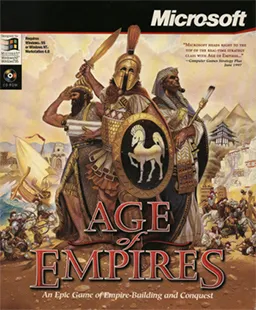
Age of Empires PC is one of the most legendary real-time strategy (RTS) games ever created. Originally released by Ensemble Studios and published by Microsoft, this game set the foundation for modern strategy titles. While there are mobile spin-offs and console mentions, the PC version remains the definitive way to experience Age of Empires. Its combination of detailed controls, strategic depth, and modding potential makes it unmatched compared to other platforms.
What makes the PC version of Age of Empires truly unique is its sandbox-style RTS mechanics. Players can build empires from scratch, manage resources like food, wood, gold, and stone, and lead their chosen civilization to victory through diplomacy, technology, or military conquest. Unlike simplified mobile or console adaptations, the PC version gives players total control with mouse and keyboard, enabling complex strategies and multitasking that define the RTS genre.
Beyond gameplay, Age of Empires has achieved cultural and historical significance. With multiple expansions and the remastered Definitive Edition, it has sustained a vibrant player base for decades. The modding community on PC has introduced new civilizations, campaigns, and quality-of-life enhancements, ensuring that the game remains relevant in 2025. From esports tournaments to classroom history lessons, Age of Empires PC continues to shape both gaming culture and education, making it a true viral phenomenon in strategy gaming.
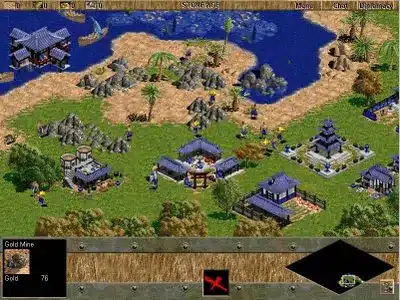
Features
Diverse Civilizations
One of the strongest appeals of Age of Empires PC is its variety of civilizations. Players can command Egyptians, Greeks, Persians, and many more. Each civilization comes with unique bonuses, technologies, and special units, ensuring that no two games feel the same. This diversity encourages players to experiment with strategies and learn the strengths of different empires.
Resource Gathering and Management
Every empire needs resources to thrive, and in Age of Empires, resource management is at the heart of gameplay. Players must gather food, wood, gold, and stone to construct buildings, train armies, and research technologies. New players quickly learn that balancing these resources is crucial to both survival and expansion.
Advancing Through the Ages
The game is structured around technological progression. Starting from the Stone Age, players can progress through multiple Ages, unlocking new buildings, units, and technologies. Each advancement represents a leap in strategic potential and often determines who gains the upper hand in a match.
Strategic Combat System
Unlike simple battle mechanics in other games, Age of Empires PC emphasizes tactics and unit composition. Infantry, archers, cavalry, and siege weapons all have strengths and weaknesses. Learning how to position and combine units effectively is essential for victory, making every battle a test of strategy.
Immersive Campaigns
The campaign mode offers historically inspired missions based on real events and leaders. These stories not only immerse players in the gameplay but also provide a history lesson in the process. From Egyptian dynasties to Roman conquests, campaigns are both challenging and educational.
Multiplayer Battles
For competitive players, the multiplayer mode is where Age of Empires truly shines. Players can compete against friends or global opponents, testing their empire-building skills in real-time. The online community remains active, offering endless opportunities for competitive or cooperative play.
Modding and Custom Content
The PC version thrives because of its modding community. Players can create and download custom campaigns, maps, and even civilizations. This feature keeps the game endlessly fresh and ensures players always have new challenges and content to explore.
Enhanced Graphics in Definitive Edition
The Definitive Edition brings remastered graphics, improved textures, and high-resolution detail to the game. This makes Age of Empires PC feel modern while retaining its classic charm, making it appealing for both nostalgic fans and new players.
AI Improvements and Smarter Opponents
Early versions of the game had basic AI, but modern updates have introduced smarter opponents. This makes single-player skirmishes more engaging, as the AI now adapts, attacks strategically, and defends with purpose teaching players how to handle real challenges.
Educational and Fun
Finally, Age of Empires PC is not just about gaming it’s also educational. Players gain insights into ancient civilizations, architecture, and historical warfare, all while developing critical thinking and planning skills. This blend of learning and fun is why the game continues to be popular after decades.

How to Download Age of Empires on PC?
- Click the Download button on this page to safely get the latest PC build.
- Choose your platform (Windows recommended; Mac/Linux may also be available if listed).
- When prompted, Save the file to an easy location (e.g., Downloads or Desktop).
- If the file is a .zip (or .rar), right-click it and select Extract All… to a new folder.
- Open the extracted folder and double-click
Age of Empires PC.exeto launch. - If Windows SmartScreen appears, click More info → Run anyway (only proceed if you downloaded from the button on this page).
- Optional: right-click the .exe and choose Create shortcut to pin it to Start/Desktop.
- In Options/Settings, set fullscreen/windowed, audio levels, and keybinds (WASD/Arrows).
- For future updates, return to this page and click the Download button again, then replace your old game folder with the new one.
System Requirements
| Component | Minimum Requirements | Recommended Requirements |
|---|---|---|
| OS | Windows 10 (64-bit) | Windows 11 (64-bit) |
| Processor | Intel i3 or AMD Ryzen 3 | Intel i5/i7 or AMD Ryzen 5/7 |
| RAM | 4 GB | 8 GB |
| Graphics | Intel HD 4000 / AMD Radeon HD 5570 | NVIDIA GTX 970 / AMD RX 570 |
| Storage | 20 GB free space | 20 GB SSD space |
| DirectX | Version 11 | Version 12 |
How to Play Age of Empires on PC?
Playing Age of Empires on PC is all about strategic planning and efficient multitasking. Players begin in the Stone Age with minimal resources and gradually advance through different Ages by gathering materials, building structures, and researching technologies.
In single-player campaigns, you’ll follow historical events, while in multiplayer, you’ll rely on quick decision-making to outmaneuver rivals. With keyboard shortcuts, precise mouse control, and strategic map awareness, the PC version allows maximum flexibility, ensuring you always stay a step ahead of your opponents.
Why Play Age of Empires on PC?
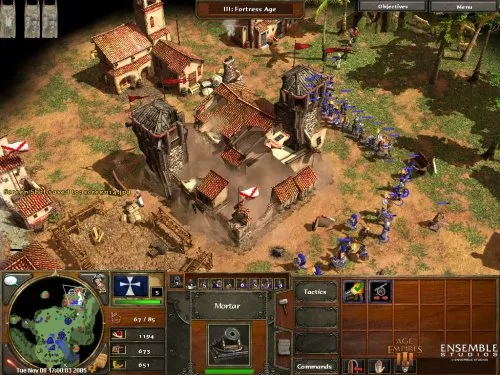
The Age of Empires PC version offers enhanced graphics, higher frame rates, and detailed textures that create a visually immersive experience. The precision of a keyboard and mouse setup allows faster gameplay and complex strategies that aren’t possible on other platforms.
Additionally, playing on PC eliminates issues like battery drain, screen limitations, and performance bottlenecks. With mods, community updates, and cross-platform progress syncing, PC remains the ultimate platform to enjoy Age of Empires in 2025.
FAQs
Is Age of Empires free to download on PC?
No, Age of Empires is a premium RTS game. However, it is often available on Steam sales or through Xbox Game Pass subscriptions at reduced costs.
Can I play Age of Empires PC offline?
Yes, once installed, you can play single-player campaigns and skirmishes offline. Multiplayer, however, requires an internet connection.
Does Age of Empires PC support mods?
Absolutely. The PC version has the most active modding community, offering everything from new civilizations to complete campaign overhauls.
What is the difference between the original and Definitive Edition?
The Definitive Edition offers enhanced visuals, better AI, improved pathfinding, and additional campaigns, making it the best way to experience the classic.
Can I run Age of Empires PC on a low-end laptop?
Yes, but performance depends on specs. The game runs on low settings with integrated graphics, but for the best experience, a dedicated GPU is recommended.
Conclusion
Age of Empires PC remains one of the most enduring and beloved strategy games of all time. From building civilizations to commanding massive armies, the game provides an unmatched RTS experience. Whether you’re revisiting the classics or trying it for the first time, the PC version guarantees the most complete and immersive gameplay. Don’t wait click the Download Button on this page and start building your empire today!


