Arknights PC
Download Arknights PC and command elite Operators in a stunning tactical RPG. Enjoy high-quality graphics, smooth gameplay, and strategic battles on computer!

Few mobile games have captured the perfect balance of strategy, storytelling, and stunning anime-style art quite like Arknights. Developed by Hypergryph and published globally by Yostar, this free-to-play tactical RPG and tower defense hybrid has become a worldwide sensation since its debut in 2019. The game boasts over 10 million downloads on mobile and consistently ranks among the top strategy games across app stores. Now, with growing global demand and emulator support, the Arknights PC version lets players enjoy this masterpiece on a larger screen with smoother performance and refined controls.
Set in the dystopian world of Terra, Arknights tells the gripping story of Rhodes Island, a medical and paramilitary organization fighting against a mysterious infection called Oripathy. As the player known as “The Doctor” you awaken from amnesia and are tasked with leading a team of Operators, each with unique abilities, origins, and backstories. Gameplay combines tower-defense tactics and real-time RPG elements, requiring players to deploy Operators strategically across grids to defend against waves of enemies. Every stage tests your tactical thinking, team composition, and timing making victory both challenging and rewarding.
The Arknights PC version takes this experience to a new level. With enhanced resolution, smoother framerates, and precise mouse or keyboard controls, managing Operators and planning defenses becomes effortless. Whether you’re a seasoned strategist or a newcomer exploring the world of Terra for the first time, Arknights delivers hours of immersive gameplay, stunning visuals, and captivating storytelling. If you’re ready to build your ultimate team of Operators and command the battlefield with superior control, it’s time to download Arknights for PC and experience one of the most acclaimed tactical RPGs ever made now optimized for your computer.

Features
Deep Tactical Tower-Defense Gameplay
Arknights PC is a tactical tower-defense RPG that challenges players to think strategically. Each stage requires careful unit placement, timing, and skill activation. You must position your Operators to block enemies, heal allies, and control the battlefield. The PC version enhances this experience with improved precision and visibility, letting you plan every move with ease.
Expansive Roster of Unique Operators
With over 200 playable Operators across multiple classes such as Vanguard, Sniper, Medic, and Caster there’s incredible depth in team building. Each Operator has a distinct backstory, voice acting, and special abilities. Playing Arknights on PC makes managing and upgrading these characters smoother and more efficient, thanks to intuitive menus and larger screen support.
Immersive Storyline Set in a Dystopian World
Arknights isn’t just about strategy; it’s also a narrative-driven experience. Set in the post-apocalyptic world of Terra, players command Rhodes Island, a pharmaceutical organization battling a mysterious infection called Oripathy. The Arknights PC version allows players to enjoy fully voiced cutscenes, rich lore, and cinematic visuals in greater detail.
High-Quality Anime-Inspired Graphics
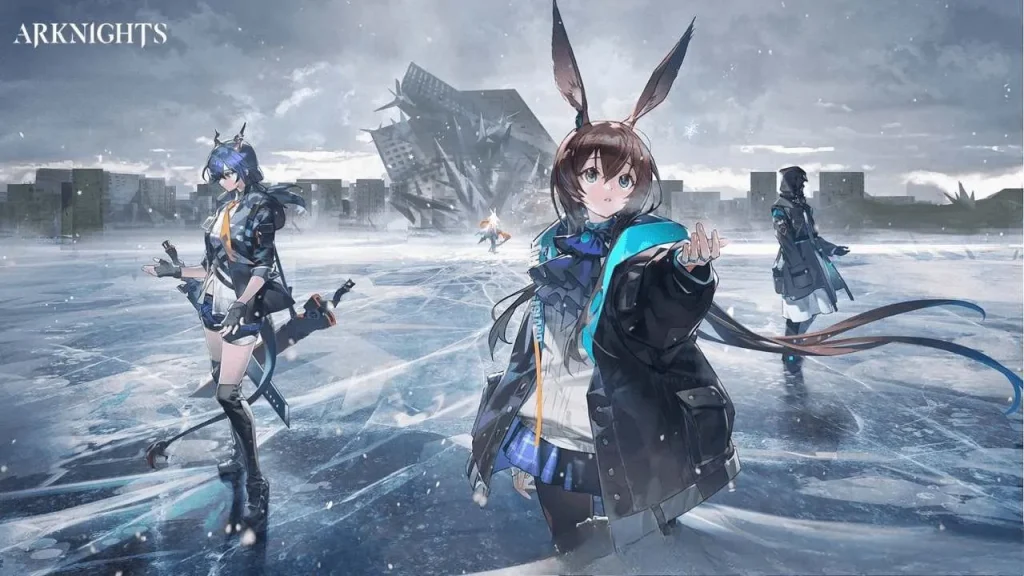
The game’s stunning art direction and animation are among its most beloved features. On PC, Arknights shines with higher resolution, vibrant colors, and smoother frame rates. The upgraded visuals make Operators’ designs, battle effects, and world environments come alive with incredible clarity.
Engaging Soundtrack and Voice Acting
From haunting orchestral themes to energetic battle music, Arknights’ soundtrack enhances every mission. The game also features professional Japanese and English voice actors, adding emotional depth to its story. The Arknights PC version offers richer sound quality, creating a more immersive experience through headphones or desktop speakers.
Free-to-Play with Fair Progression
While Arknights on PC uses a gacha system for Operator recruitment, it’s widely praised for being fair and free-to-play friendly. Even low-rarity Operators are viable, and strategic thinking matters more than spending. You can progress steadily through missions without paywalls, earning valuable rewards through gameplay.
Base Management and Resource Production
Outside of combat, you’ll manage the Rhodes Island Base, where you assign Operators to produce materials, generate power, and rest between missions. On PC, base management becomes far more streamlined drag, drop, and optimize with precision using your mouse.
Challenging Event Content and Limited Missions
The game regularly introduces limited-time events, new Operators, and side stories. These events test player skills and reward exclusive items. Playing Arknights on computer makes it easier to participate consistently thanks to improved multitasking and stability.
Strategic Auto-Deploy and Replay Features
Once you perfect a mission strategy, you can activate Auto-Deploy to replay stages automatically. The PC version ensures these auto runs are smoother, letting you grind resources efficiently while focusing on other tasks.
Consistent Updates and Expanding Universe
Developer Hypergryph continuously adds new content chapters, operators, skins, and gameplay mechanics. The Arknights PC version benefits from these updates seamlessly, keeping the experience fresh and engaging for both new and returning players.

How to Download Arknights on PC?
- Click the Download button on this page to safely get the latest PC build.
- Choose your platform (Windows recommended; Mac/Linux may also be available if listed).
- When prompted, Save the file to an easy location (e.g., Downloads or Desktop).
- If the file is a .zip (or .rar), right-click it and select Extract All… to a new folder.
- Open the extracted folder and double-click
Arknights PC.exeto launch. - If Windows SmartScreen appears, click More info → Run anyway (only proceed if you downloaded from the button on this page).
- Optional: right-click the .exe and choose Create shortcut to pin it to Start/Desktop.
- In Options/Settings, set fullscreen/windowed, audio levels, and keybinds (WASD/Arrows).
System Requirements
| Category | Minimum Requirements | Recommended Requirements |
|---|---|---|
| Operating System | Windows 10 64-bit | Windows 11 64-bit |
| Processor (CPU) | Intel Core i3 / AMD Ryzen 3 equivalent | Intel Core i5 / AMD Ryzen 5 or better |
| Memory (RAM) | 4 GB | 8 GB or more |
| Graphics (GPU) | DirectX 11 compatible GPU | NVIDIA GTX 1050 / AMD RX 560 or better |
| Storage | ~6 GB free space (emulator + game data) | SSD recommended for faster load times |
How to Play Arknights on PC?
Playing Arknights on computer involves more than just clicking play it’s about strategy and comfort. After installation, launch the game and familiarise yourself with the interface larger screen means multi-window potential, managing Operators and base tasks becomes easier. Choose a practice stage to understand the roles: Vanguards generate deployment points, Guards strike, Medics heal, Snipers deal ranged damage and so on. Place your Operators on the map grid to block enemy lanes and activate skills when needed. The PC version allows finer control and clearer layouts compared to mobile.
Once comfortable, advance through campaign chapters, build your roster, reroll if you like to optimise early picks, and engage in event content or base operations. Use the clearer UI to monitor resource generation, plan upgrades, and schedule Operators’ shifts. Whether executing complex stages or grinding for rare Operators, playing Arknights on PC offers the space, precision and multitasking advantages that elevate your tactical gameplay.
Why Play Arknights on PC?
There are strong reasons why you should consider the Arknights PC version or playing on computer rather than mobile. First, enhanced graphics and larger display mean you’ll enjoy all the visual detail from character designs to battlefield animations with less eye strain and more immersion. Keyboard/mouse controls or even gamepad support give you smoother interaction, faster deployment, and less fatigue during long sessions.
Secondly, the PC platform offers practical benefits: no battery drain, better cooling, easier multitasking (stream, chat, track guides), and running multiple accounts or windows becomes simple. Cross-platform sync often allows you to continue your progress between mobile and PC seamlessly, meaning you’re not locked into one device. For players who value strategic depth, comfort, and flexibility, playing Arknights on PC is the clear choice.
FAQs
Is Arknights officially available on PC?
Currently, Arknights does not have an official standalone PC version developed by Hypergryph. However, players can easily play Arknights on PC using trusted Android emulators like BlueStacks, LDPlayer, or MuMu Player. These platforms optimize the game for larger screens, smoother controls, and better performance. Hypergryph has also announced plans for a native Arknights PC version, expected to release in the near future.
How can I download Arknights for PC safely?
To download Arknights for PC, click the verified Download Button provided on this page or use the official emulator websites. Once installed, sign in with your Google account, search “Arknights” in the Play Store, and install it directly. Avoid unofficial or third-party sites to prevent malware or account risks. Official emulators also provide cross-platform syncing with your existing mobile account.
Can I sync my mobile Arknights progress on PC?
Yes! Your Arknights account progress is fully transferable between mobile and PC when using the same login credentials. Simply log in through your linked Yostar, Apple, or Google account on the emulator. All your Operators, story progress, and resources will sync automatically, allowing you to continue seamlessly across devices.
What are the benefits of playing Arknights on PC?
The Arknights PC version offers numerous advantages enhanced graphics, smoother frame rates, and easy keyboard/mouse control for tactical precision. It eliminates mobile limitations like battery drain or small screen strain. Players can also multitask effortlessly, run multiple instances, and manage base operations more efficiently.
Is Arknights free to play on PC?
Yes, Arknights is completely free to play on PC via emulators. Players can summon new Operators, complete story missions, and participate in global events without spending real money. Optional in-game purchases exist for cosmetics and gacha pulls, but they are not required to progress or compete effectively.
Conclusion
Arknights PC brings one of the most acclaimed tactical RPGs to a whole new level. With stunning visuals, complex strategy, and deep storytelling, it’s a must-play for fans of anime-style strategy games. The PC version enhances gameplay with smoother performance, better control, and a more immersive experience overall. Whether you’re defending Rhodes Island or collecting your favorite Operators, this is the best way to enjoy Arknights. Strategy, character collection, engaging story and base-management all become more comfortable and immersive. Whether you’re strategizing deployments, building your roster of Operators, or tackling challenging events, the PC environment offers a clear upgrade.