Phantasy Star Universe PC
Download Phantasy Star Universe PC and explore the stars! Battle enemies, master Photon Arts, and experience SEGA’s epic sci-fi RPG adventure on your computer.

Step into a universe where science fiction meets fantasy with Phantasy Star Universe PC, the acclaimed action role-playing game developed by Sonic Team and published by SEGA. Released as part of the long-running Phantasy Star series, this title expanded the franchise’s reach beyond consoles, offering a deeply immersive experience for PC gamers. With its mix of real-time combat, rich storytelling, and cooperative online play, Phantasy Star Universe became a landmark RPG that still holds a special place in the hearts of fans.
The story follows Ethan Waber, a young Guardian-in-training, as he fights to protect the Gurhal System from an ancient evil. Players can explore sprawling futuristic cities, alien worlds, and mysterious dungeons, all while upgrading their weapons, customizing characters, and mastering powerful Photon Arts. The game’s seamless blend of action combat and RPG progression gives players the best of both worlds fast-paced gameplay and deep strategic customization.
Now available as a Phantasy Star Universe PC version, this classic title takes advantage of modern systems with enhanced visuals, optimized controls, and community-supported servers that keep the experience alive. Whether you’re a longtime fan of SEGA’s RPGs or a newcomer seeking a fresh sci-fi adventure, this is the perfect time to download Phantasy Star Universe for PC and join the Guardians in their intergalactic fight for peace.
Features
Rich Storyline Across Multiple Worlds
Phantasy Star Universe PC features an immersive narrative set in the Gurhal System, a galaxy made up of three inhabited planets. You follow Ethan Waber, a young man drawn into an interplanetary war against the mysterious SEED creatures. The story unfolds through cinematic cutscenes, voiced dialogue, and emotional character arcs, giving the single-player mode a compelling RPG feel.
Dual Gameplay Modes – Story and Network
The game offers two main ways to play: Story Mode for solo players and Network Mode for multiplayer enthusiasts. Story Mode delivers a structured, narrative-driven campaign, while Network Mode lets players explore online missions, events, and cooperative gameplay with others around the world. This dual approach ensures both solo and social players have endless content to enjoy.
Fast-Paced Real-Time Combat
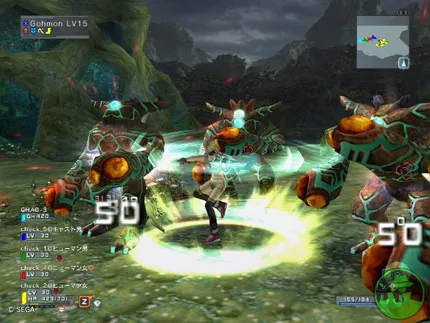
Unlike traditional turn-based RPGs, Phantasy Star Universe on PC features real-time action combat. Players can freely move during battles, chain attacks into combos, and perform Photon Arts powerful techniques that consume energy but deal massive damage. This system blends the strategic depth of an RPG with the intensity of an action game.
Deep Character Customization
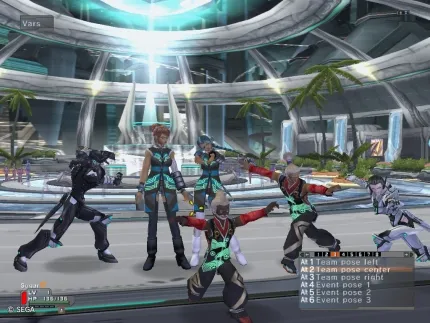
Before starting your adventure, you can create your own Guardian, customizing everything from appearance to race and class. Choose among Humans, CASTs (androids), Newmans, and Beasts, each with distinct traits. Players can also pick from Hunter, Ranger, and Force classes, then evolve them over time by gaining experience and upgrading abilities.
Massive Arsenal of Weapons
Combat variety is at the heart of Phantasy Star Universe PC. Players can wield an impressive range of weapons including swords, sabers, rifles, bows, and staves. Each weapon type supports unique Photon Arts, which unlock flashy attack combos or magical techniques. Experimenting with weapon loadouts keeps combat fresh and rewarding.
Cooperative Online Multiplayer
In Network Mode, players can join others to complete missions, defeat bosses, and earn rare loot. The PC version supports fan-hosted servers, keeping the multiplayer community alive years after the official servers were shut down. Teamwork, strategy, and coordination are key to success in higher-level missions.
Beautiful Sci-Fi Visuals
Even years after its release, Phantasy Star Universe PC version still impresses with its vibrant art direction. From futuristic space colonies to alien jungles and volcanic planets, each environment feels alive. Enhanced resolution and widescreen support on PC make the visuals sharper and more immersive than ever.
Engaging Progression and Crafting
Leveling up isn’t just about stats players can enhance weapons, upgrade Photon Arts, and craft powerful items. Collect resources from missions to forge gear, boost attributes, and create custom builds that suit your preferred combat style.
Expansions and New Missions
The Ambition of the Illuminus expansion adds new story content, classes, and advanced missions. This expanded content keeps players engaged long after completing the main campaign, introducing new areas, challenges, and customization options.
Optimized PC Controls and Performance
The PC version offers keyboard and mouse support, along with controller compatibility for smooth gameplay. You can adjust graphics settings, rebind keys, and enjoy faster load times. The game runs efficiently even on mid-tier hardware, ensuring a seamless experience for all players.
How to Download Phantasy Star Universe on PC?
- Click the Download button on this page to safely get the latest PC build.
- Choose your platform (Windows recommended; Mac/Linux may also be available if listed).
- When prompted, Save the file to an easy location (e.g., Downloads or Desktop).
- If the file is a .zip (or .rar), right-click it and select Extract All… to a new folder.
- Open the extracted folder and double-click
Phantasy Star Universe PC.exeto launch. - If Windows SmartScreen appears, click More info → Run anyway (only proceed if you downloaded from the button on this page).
- Optional: right-click the .exe and choose Create shortcut to pin it to Start/Desktop.
- In Options/Settings, set fullscreen/windowed, audio levels, and keybinds (WASD/Arrows).
System Requirements
| Specification | Minimum Requirements | Recommended Requirements |
|---|---|---|
| OS | Windows 7 (64-bit) | Windows 10 / 11 (64-bit) |
| Processor | Intel Core i3 / AMD FX-6300 | Intel Core i5 / AMD Ryzen 5 |
| RAM | 4 GB | 8 GB |
| Graphics | NVIDIA GTX 660 / AMD HD 7850 | NVIDIA GTX 1050 Ti / AMD RX 570 |
| Storage | 10 GB free space | 15 GB SSD |
| Internet | Broadband connection | High-speed connection for online play |
How to Play Phantasy Star Universe on PC?
Once you’ve downloaded and installed Phantasy Star Universe PC, launch the game to begin your journey across the Gurhal System. You’ll start by creating a custom character, selecting from different races and classes each with unique skills and abilities. Begin your adventure in Story Mode to follow the tale of Ethan Waber and learn the mechanics of combat, leveling, and Photon Arts. The gameplay is a blend of real-time action and RPG elements, where you can switch weapons, perform combos, and use special Photon abilities in fast-paced battles.
In Network Mode, players can join online servers to complete missions, fight powerful bosses, and earn rare loot with others. Use your keyboard and mouse or a controller for precise combat and exploration. Upgrade your weapons, experiment with Photon Arts, and master your class to progress through increasingly difficult missions. The PC version’s smoother frame rates, detailed visuals, and responsive controls make the experience more fluid and immersive, whether playing solo or with friends online.
Why Play Phantasy Star Universe on PC?
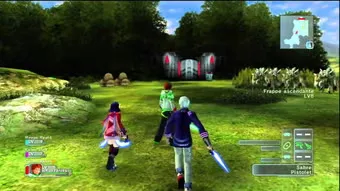
Playing Phantasy Star Universe on PC unlocks the game’s full potential. With enhanced graphics, high-resolution textures, and improved lighting, the sci-fi environments come alive like never before. The PC version also benefits from faster load times, stable performance, and the ability to adjust settings for smooth gameplay on both high-end and mid-range hardware.
In addition to the visuals, keyboard and mouse controls provide more accuracy and faster reaction times during combat. Players can enjoy longer play sessions without battery drain, take advantage of multitasking, and play on a larger screen for a cinematic experience. Combined with community-supported online play and cross-platform progress syncing, Phantasy Star Universe PC version is the ultimate way to experience SEGA’s classic space adventure.
FAQs
Is Phantasy Star Universe available on PC?
Yes, Phantasy Star Universe PC version was released by SEGA and can still be played today through fan-supported servers. These servers recreate the full online multiplayer experience, including missions, events, and trading.
Can I play Phantasy Star Universe offline?
Absolutely! The Story Mode allows you to play offline and experience the complete narrative campaign. You’ll follow Ethan Waber’s journey while learning game mechanics and earning rewards.
Does Phantasy Star Universe PC support multiplayer?
Yes. While SEGA’s official servers are offline, fan communities host private servers where players can connect, form parties, and complete missions together. These servers are free and active with a dedicated player base.
What are Photon Arts in Phantasy Star Universe?
Photon Arts are special abilities that enhance your weapons and attacks. They can be offensive techniques, defensive buffs, or elemental skills. Players can level up Photon Arts to increase their power and effectiveness in battle.
Can I use a controller in the PC version?
Yes, Phantasy Star Universe PC supports both keyboard/mouse and controller inputs. You can switch between them easily and customize key bindings for optimal gameplay comfort.
Conclusion
Phantasy Star Universe PC is a timeless sci-fi action RPG that blends fast-paced combat, deep customization, and a captivating storyline. With enhanced graphics, modern controls, and active online servers, it’s the perfect time to revisit this interstellar classic. Don’t wait click the download button on this page to start your adventure across the Gurhal System and become the Guardian the universe needs!r adventure today!