Angry Birds PC
Enjoy Angry Birds PC with precise mouse aiming, sharper visuals, and smooth gameplay. Launch birds, destroy Piggie forts, and experience the classic puzzle fun on PC.

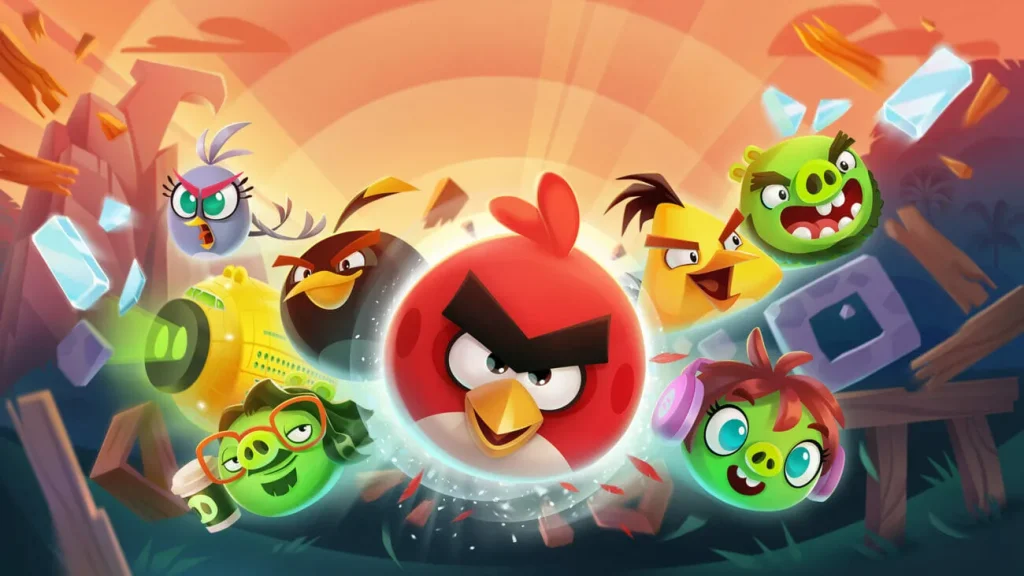
Angry Birds PC brings one of the world’s most recognizable puzzle franchises directly to your computer, offering smoother gameplay, sharper visuals, and a more immersive puzzle-solving experience. Created by Rovio Entertainment, this Finnish video game became a global sensation shortly after its launch, quickly surpassing hundreds of millions of downloads worldwide. With its fun slingshot mechanics, unique bird abilities, and physics-based destruction puzzles, Angry Birds continues to be a go-to game for players of all ages. The game’s simple controls and addictive level progression make it equally enjoyable for casual players and puzzle enthusiasts.
The Angry Birds PC version enhances everything players already love about the franchise. On a larger screen, every detail breakable structures, pig animations, and explosive impacts looks better and more vibrant. The PC version also offers smoother drag-and-release controls using either a mouse or trackpad, giving players a precision advantage over mobile users. Whether you’re launching Red for a direct hit or using Bomb’s explosive ability to destroy thick blocks, PC gameplay feels more fluid and responsive.
Angry Birds remains one of the highest-grossing and most downloaded puzzle games of all time. With multiple spin-offs, movies, merchandise, and cultural popularity, it continues to attract millions of new players. If you’re ready to enjoy the best version of the classic game, scroll down and click the Download button on this page to safely download Angry Birds for PC and start your slingshot adventure today. Whether you’re reliving nostalgia or discovering Angry Birds for the first time, the PC experience is the most enjoyable way to play.
Features
Classic Physics-Based Slingshot Gameplay
At its core, Angry Birds PC is all about physics: angle, force, and trajectory. Players drag the slingshot, aim at structures, and release birds with different abilities to defeat the Piggies. This physics-based gameplay is highly intuitive and teaches new players how objects react to impact. The PC version enhances this experience by offering smoother drag-controls and precise aiming with the mouse, helping beginners learn shot prediction more accurately.
Unique Birds With Special Powers
One of the defining features of Angry Birds PC is its lineup of colorful birds, each equipped with a special power that dramatically affects gameplay. Understanding these abilities is essential for solving more advanced puzzles and maximizing damage with fewer shots. The game gradually introduces players to each bird so they learn how and when to use them effectively. Red, the iconic main character, is your basic bird with no special power, making him perfect for beginners to practice aiming, distance judgment, and trajectory prediction.
Hundreds of Levels With Progressive Difficulty
Angry Birds offers hundreds of levels across themed worlds. Early levels introduce basic mechanics, materials, and angles. As you progress, puzzles become larger, more complex, and require strategic thinking. Some levels demand precision aiming, while others require you to experiment with bird combos. This natural difficulty curve is perfect for educating new players on all aspects of the game.
Improved Accuracy and Control on PC
One of the biggest reasons players prefer the Angry Birds PC version is the precision offered by mouse controls. Unlike touchscreen devices, a mouse allows exact control over slingshot pull distance, angle, and launch timing. New players can take advantage of this precision to improve accuracy, understand trajectories better, and experiment with different approaches without accidental misfires.
Beautiful Graphics on Larger Screens
The PC version enhances the game’s vibrant visuals, making every explosion, animation, and level detail pop on large monitors. Wooden blocks splinter, glass shatters realistically, and the Piggies’ reactions become more visible and entertaining. This visual clarity helps new players analyze structures, spot weak points, and improve strategic planning.
Realistic Material Behavior & Structure Physics
Every structure is made up of materials like wood, glass, stone, and metal. Each reacts differently to impact wood breaks easily, glass shatters with precise hits, and stone requires heavy force or explosive birds. Learning how materials respond to different birds is essential for improving your game. Angry Birds teaches players how to identify weak spots and collapse structures using fewer shots.
Mighty Eagle Power-Up for Difficult Levels
Beginners often struggle with challenging stages, and that’s where the Mighty Eagle comes in. This powerful character can clear entire levels instantly. While it doesn’t work in every mode, it helps stuck players progress and teaches them how structures fall, providing valuable learning moments. The Mighty Eagle functions as an optional assist feature for new players.
Offline Gameplay Anytime, Anywhere
A major advantage of playing Angry Birds on computer is that it doesn’t require an internet connection. Once installed, you can play anytime perfect for offline breaks, travel, homes without stable internet, or casual gaming sessions. Beginners can practice freely without worrying about connection drops.
Rewarding Star-Based Progression System
Each level awards one to three stars based on shot efficiency, destruction level, and skill. This star-based system encourages players to replay levels and improve their scores. For new players, it provides motivation to refine strategies and experiment with different birds and angles. It also adds replayability and long-term engagement.
Suitable for All Ages With Simple, Fun Gameplay
One reason Angry Birds is globally successful is its universal appeal. Kids can enjoy the charming character designs and easy mechanics, while adults appreciate the clever puzzles and strategy. The game doesn’t require fast reflexes only logic and timing making it perfect for players of any age or skill level. On PC, the easy controls, clear visuals, and comfortable gameplay environment make it even more accessible for beginners.

How to Download Angry Birds on PC?
- Click the Download button on this page to safely get the latest PC build.
- Choose your platform (Windows recommended; Mac/Linux may also be available if listed).
- When prompted, Save the file to an easy location (e.g., Downloads or Desktop).
- If the file is a .zip (or .rar), right-click it and select Extract All… to a new folder.
- Open the extracted folder and double-click
Angry Birds PC.exeto launch. - If Windows SmartScreen appears, click More info → Run anyway (only proceed if you downloaded from the button on this page).
- Optional: right-click the .exe and choose Create shortcut to pin it to Start/Desktop.
- In Options/Settings, set fullscreen/windowed, audio levels, and keybinds (WASD/Arrows).
System Requirements
| Category | Minimum Requirements | Recommended Requirements |
|---|---|---|
| OS | Windows 7/8/10/11 | Windows 10/11 |
| Processor | Intel Core i3 | Intel Core i5 or higher |
| RAM | 2 GB | 4 GB |
| GPU | Intel HD Graphics | Dedicated GPU |
| Storage | 300 MB | 300 MB SSD |
How to Play Angry Birds PC on PC?
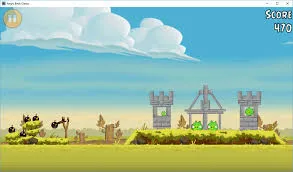
Playing Angry Birds PC is simple, fun, and intuitive, especially with mouse controls. After launching the game, select your level and you’ll see the familiar slingshot on the left side of the screen. Click and hold the bird with your mouse, pull it backward to adjust the tension, aim using the dotted trajectory line, and release to launch. Start slow by practicing your aim and learning how different materials wood, glass, and stone—break under impact. Early levels help you understand angles, momentum, and shot distance. As you gain confidence, start incorporating bird abilities by clicking or tapping at the right moment mid-flight.
More advanced levels require strategic planning and creative problem-solving. You may need to trigger Chuck’s speed, Bomb’s explosion, or The Blues’ triple split precisely to take down tricky structures. The PC version offers superior control, making it easier to aim accurately and time abilities perfectly. Replay levels to earn more stars, experiment with different shots, and observe how materials collapse when hit from various angles. With enough practice, you’ll master the art of destruction and breeze through even the toughest Piggie fortresses.
Why Play Angry Birds on PC?
Playing Angry Birds on PC offers major advantages over mobile, starting with better graphics and a larger display. The bigger screen helps players see structures clearly, identify weak points, and plan shots more effectively. Mouse controls provide precision aiming, eliminating the frustration of accidental touches or inaccurate swipes. The PC version also runs smoother, with faster animations and stable performance even in complex levels. And best of all, you never have to worry about battery drain or device heating.
Players also love the flexibility and comfort of gaming on a computer. You can multitask easily, switching between apps while keeping the game running. Progress can sync across devices if connected to your account, meaning you can continue playing on mobile later if needed. Whether you’re a beginner or a long-time fan, the Angry Birds PC version delivers the most convenient, smooth, and enjoyable way to experience this classic puzzle game.
FAQs
Is Angry Birds free to play on PC?
Yes, Angry Birds is free to play on PC. You can download and install it using the button provided on this page without any purchase required.
Can I play Angry Birds offline on my computer?
Yes, once installed, the game works completely offline. This allows you to enjoy all levels anytime, even without an internet connection.
Are mouse controls better than touch controls?
Absolutely. Mouse controls offer precise aiming and smoother drag mechanics, making it easier to hit targets and master tricky levels compared to touchscreen devices.
Can children play Angry Birds on PC?
Yes! Angry Birds is safe, fun, and simple for kids. Its colorful visuals, easy gameplay, and beginner-friendly mechanics make it suitable for all ages.
Does the PC version save progress automatically?
Yes, your progress is saved automatically within the game. If connected to your account, progress can also sync across devices like mobile or tablet.
Conclusion
Angry Birds PC delivers the classic slingshot puzzle adventure in the most enjoyable way possible smooth performance, precise controls, and enhanced visuals. Whether you’re reliving childhood nostalgia or discovering the game for the first time, the PC version offers a superior experience with offline support, better accuracy, and larger-screen clarity. With hundreds of levels and fun bird abilities, the game remains endlessly entertaining. Click the Download button on this page to safely install Angry Birds on your PC and start your puzzle-crushing journey today.