Cities: Skylines PC
Build the city of your dreams with Cities: Skylines PC. Manage infrastructure, traffic, and economy while designing a vibrant metropolis filled with endless creativity and challenges.

Cities: Skylines PC stands as one of the most celebrated city-building games of the modern era. Released in 2015 by Colossal Order and published by Paradox Interactive, this title has become the definitive platform for aspiring urban planners and simulation enthusiasts. The PC version is not just the original release but also the most feature-rich edition, offering unparalleled flexibility and performance compared to console counterparts. With intuitive keyboard and mouse controls, expansive modding support, and enhanced graphics, the PC remains the true home of this iconic city-builder.
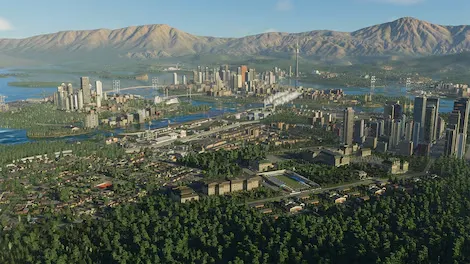
What sets Cities: Skylines on PC apart is its boundless sandbox gameplay. Unlike linear or restricted management games, Cities: Skylines empowers players to shape their dream cities from the ground up. Every decision zoning neighborhoods, designing transport systems, managing pollution, or responding to citizen needs carries weight. The PC version shines here, offering faster processing, intricate detail management, and the ability to scale up to truly massive metropolises. The sheer creative freedom makes it more than just a game; it’s a digital canvas for urban design.
Beyond gameplay, Cities: Skylines PC version has cemented its cultural footprint in the gaming world. The modding community has turned the game into a phenomenon, with thousands of fan-made assets, custom maps, and gameplay overhauls available through the Steam Workshop. This ecosystem has kept the game alive for years, ensuring new experiences for players worldwide. Its popularity has even reached academic and professional circles, where urban designers use it to model real-world city planning. With millions of copies sold and countless fan creations, Cities: Skylines has truly become a global sensation.
Features
Expansive City-Building Sandbox
Cities: Skylines PC offers a truly open-ended sandbox where players can design everything from quiet suburban towns to massive metropolitan hubs. The larger map sizes and extended building options on PC allow for limitless creativity, letting you scale your city to unimaginable heights.
Realistic Urban Simulation
Every citizen, car, bus, and service is simulated individually. This means your city operates like a living organism, where traffic jams, electricity shortages, or healthcare crises directly affect the happiness and productivity of residents.
Advanced Zoning Controls
The zoning system is a cornerstone of gameplay. Players can assign residential, commercial, and industrial districts with precision. On PC, zoning feels smoother thanks to keyboard/mouse accuracy, giving you full control over neighborhood design.
Sophisticated Traffic Management
Traffic flow is one of the game’s most exciting (and challenging) features. From roundabouts to expressways, you’ll need to carefully plan roads to avoid gridlock. The PC version is further enhanced by mods like “Traffic Manager,” which give you even deeper control over intersections and signals.
Public Services and Infrastructure
Running a city isn’t just about roads and buildings. You must provide essential services like police, fire departments, hospitals, schools, and waste management. Expanding your infrastructure efficiently ensures that citizens remain safe, educated, and productive.
Policy Making and City-Wide Laws
Cities: Skylines PC allows you to enact policies that impact the entire population. Whether you want to encourage green energy, ban smoking in public places, or adjust tax rates, policies let you shape the social and economic life of your city.
Dynamic Day-Night and Weather Cycles
Time and weather affect how your city functions. Rush-hour traffic peaks during the day, while nighttime brings quieter streets. Weather elements such as rain or snow add visual immersion and can even impact infrastructure like road safety.
DLC Expansions for Endless Variety
Paradox Interactive has released multiple DLCs including After Dark, Snowfall, Mass Transit, and Green Cities. Each expansion introduces new mechanics like tourism, trams, eco-friendly buildings, and natural disasters, keeping gameplay fresh and exciting.
Steam Workshop and Modding Support
The heart of Cities: Skylines PC lies in its modding community. Players can access thousands of user-created assets, maps, and overhauls through Steam Workshop. This constant flow of new content makes every playthrough unique and extends the game’s lifespan indefinitely.
Educational and Professional Applications
Beyond gaming, Cities: Skylines PC has gained recognition in academic and professional environments. Urban planners, teachers, and even architects use it to model real-world scenarios, demonstrating the game’s incredible depth and versatility.

How to Download Cities: Skylines on PC?
- Click the Download button on this page to safely get the latest PC build.
- Choose your platform (Windows recommended; Mac/Linux may also be available if listed).
- When prompted, Save the file to an easy location (e.g., Downloads or Desktop).
- If the file is a .zip (or .rar), right-click it and select Extract All… to a new folder.
- Open the extracted folder and double-click
Cities: Skylines PC.exeto launch. - If Windows SmartScreen appears, click More info → Run anyway (only proceed if you downloaded from the button on this page).
- Optional: right-click the .exe and choose Create shortcut to pin it to Start/Desktop.
- In Options/Settings, set fullscreen/windowed, audio levels, and keybinds (WASD/Arrows).
- For future updates, return to this page and click the Download button again, then replace your old game folder with the new one.
System Requirements
Here are the minimum and recommended system requirements:
| Component | Minimum Requirements | Recommended Requirements |
|---|---|---|
| OS | Windows 7/8/10 (64-bit) | Windows 10/11 (64-bit) |
| Processor | Intel Core 2 Duo 3.0 GHz | Intel Core i5/i7 or AMD FX |
| Memory (RAM) | 4 GB | 8 GB |
| Graphics | NVIDIA GeForce GTX 260 / ATI Radeon HD 5670 | NVIDIA GTX 660 / AMD Radeon HD 7870 |
| DirectX | Version 11 | Version 11 |
| Storage | 4 GB available space | 6 GB available space |
How to Play Cities: Skylines on PC?
Starting a city in Cities: Skylines PC begins with choosing a map and laying down the foundation of your dream metropolis. The first step is to build essential roads, as they form the backbone of your city’s infrastructure. Next, you’ll zone land into residential, commercial, and industrial districts to create a balanced economy. Providing utilities such as electricity, clean water, and sewage systems ensures your citizens stay happy and healthy. As your population grows, you’ll unlock additional services like schools, healthcare, police, and fire stations, all of which are vital for maintaining order and progress.
Once your basic city is running, the real challenge begins managing expansion and keeping everything efficient. You’ll need to monitor traffic, reduce pollution, and balance budgets while responding to citizen demands. Smart road planning and public transport systems help reduce congestion, while green energy policies make your city sustainable. With PC-exclusive advantages like mods and DLCs, you can customize gameplay to fit your vision, whether it’s building a futuristic eco-city or replicating real-world urban centers. The game rewards creativity, patience, and strategy, making every playthrough unique and endlessly replayable.
Why Play Cities: Skylines on PC?
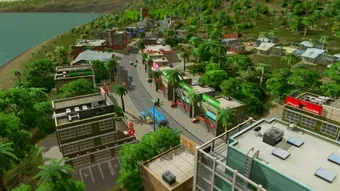
The PC version of Cities: Skylines offers the most complete and flexible city-building experience. With enhanced graphics, higher performance, and precise keyboard and mouse controls, managing complex layouts and massive cities feels smooth and intuitive. Unlike console versions, the PC edition supports larger maps, faster load times, and superior multitasking allowing players to run detailed simulations without restrictions.
Another major advantage of playing Cities: Skylines on computer is modding. Through Steam Workshop, PC players gain access to thousands of mods, custom assets, and gameplay overhauls that expand possibilities far beyond the base game. From adding real-world landmarks to redesigning traffic AI, mods keep the game fresh and limitless. Combine this with no battery drain, bigger screens, and easier access to DLCs, and it’s clear why the PC remains the definitive platform for this city-building masterpiece.
FAQs
Is Cities: Skylines free to play on PC?
No, Cities: Skylines is a premium city-building game. However, it often goes on sale during events like the Steam Summer Sale or Winter Sale, where you can grab it at a discount. Sometimes, platforms like Epic Games Store have even offered it for free for a limited time.
What makes the PC version of Cities: Skylines better than consoles?
The PC version offers smoother performance, larger city sizes, and precise controls using keyboard and mouse. Most importantly, PC players have full access to mods through Steam Workshop, which greatly expands gameplay beyond the base version.
Can my PC run Cities: Skylines?
Most modern PCs can handle Cities: Skylines without issues. At minimum, you’ll need 4 GB of RAM, a dual-core processor, and a basic graphics card like the GTX 260. For optimal performance, 8 GB RAM and a stronger GPU such as GTX 660 are recommended.
Does Cities: Skylines support multiplayer on PC?
Officially, Cities: Skylines is a single-player game. However, the active modding community has developed unofficial multiplayer mods that allow players to collaborate on the same city. These require some technical setup but can be a fun alternative.
How many DLCs are available for Cities: Skylines PC?
There are more than a dozen expansions and content packs. Popular ones include After Dark (tourism & nightlife), Mass Transit (advanced transport), and Green Cities (eco-friendly development). Each DLC adds depth and variety to the gameplay.
Is Cities: Skylines beginner-friendly?
Yes, while the game offers deep mechanics, it starts simple with easy-to-follow tutorials. Beginners can begin with small towns and gradually learn zoning, budgeting, and traffic management without feeling overwhelmed. Mods also allow players to adjust the difficulty.
Why is Cities: Skylines still so popular on PC years after release?
The game’s longevity comes from its thriving community, modding support, and frequent updates. Players can design endless city types, from futuristic utopias to realistic recreations of real-world cities. Its mix of realism, creativity, and freedom ensures it never gets old.
Conclusion
Cities: Skylines PC is more than just a city-building game it’s a limitless sandbox that empowers players to design, manage, and expand their dream metropolis. With realistic simulations, detailed zoning, and powerful mod support, the PC version delivers unmatched creativity and control. Whether you’re a beginner or an experienced strategist, every session offers new challenges and possibilities. Ready to build the city of your dreams? Click the download button on this page and start your ultimate city-building journey today!