
Gacha Life PC
Create your dream anime characters and stories with Gacha Life PC! Enjoy enhanced graphics, smooth controls, and endless creativity free to play on your computer!

If you’ve ever dreamed of designing your own anime characters, crafting stories, or immersing yourself in a world of creativity and color, Gacha Life PC is your perfect playground. Originally developed by Lunime, this popular anime dress-up and role-playing game has captivated millions of fans across mobile and desktop platforms alike. Since its debut, it’s been downloaded over 50 million times, establishing itself as one of the most-loved games in the anime gaming community.
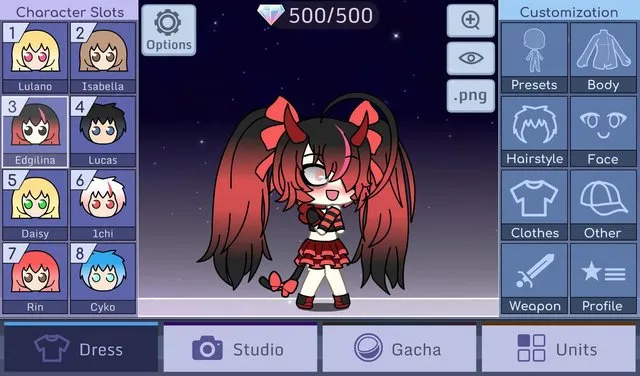
The game lets players create unique characters using countless customization options hairstyles, outfits, accessories, poses, and backgrounds giving life to every imagination. The Gacha Life PC version takes this creativity even further by offering smoother performance, improved controls, and a more immersive experience on a larger screen. Whether you’re exploring the world of Gacha, chatting with NPCs, or designing scenes in Studio Mode, every moment feels fresh and fun.
With PC support, fans can now download Gacha Life for PC and enjoy an enhanced version of the mobile hit complete with keyboard controls, better visuals, and lag-free gameplay. Keep reading to learn how to install, play, and experience Gacha Life like never before!

Features
Deep Character Customization
Gacha Life PC lies its powerful character creation system. Players can design their dream anime avatars using over 100 hairstyles, 300 outfits, and dozens of accessories. From head to toe, every element can be personalized including eyes, mouth, skin tone, and poses. You can even adjust colors for each item to make your character one-of-a-kind.
Studio Mode for Story Creation
Want to become your own anime director? Studio Mode lets players set up custom scenes using their characters. Add dialogue, expressions, props, and backgrounds to create short stories, memes, or even full-fledged webcomics. This mode is especially popular among content creators who share their scenes on YouTube or social media.
Interactive Life Mode
Life Mode takes you beyond customization and into the Gacha world itself. Explore towns, schools, and parks while meeting more than 100 NPCs each with unique personalities and secrets. Interact with them to unlock new dialogues, mini-quests, and hidden surprises that enrich your gameplay experience.
Exciting Gacha System
The “Gacha” mechanic is the game’s signature feature. Spin the gacha machine to earn virtual gifts, rare outfits, and items that enhance your characters. Each pull is unpredictable, keeping the excitement alive as you expand your wardrobe and collection.
Fun Mini-Games
When you need a break from designing characters, dive into the built-in mini-games. Titles like Duck & Dodge and Phantom’s Remix offer fast-paced fun while rewarding you with gems. These gems can be used to unlock exclusive items in the gacha system, adding both challenge and reward to your gameplay.
Offline Play Support
Unlike many modern games, Gacha Life PC version doesn’t rely on an internet connection. You can play completely offline, making it the perfect companion for long trips or areas with limited Wi-Fi access.
Enhanced Graphics and Performance
On PC, Gacha Life shines with sharper visuals and faster frame rates. The high-definition anime art looks even more vibrant on larger screens, and players can enjoy smoother transitions without lag or stuttering especially compared to mobile versions.
Keyboard and Mouse Integration
The PC version offers full support for keyboard and mouse, giving players more control and precision. Editing scenes, selecting outfits, and managing items becomes quicker and easier especially for creators who design complex storyboards.
Safe and Free-to-Play Experience
Gacha Life is free to download and play. The PC version maintains a safe, ad-free environment, making it suitable for all ages. Players can enjoy endless creativity without worrying about intrusive pop-ups or hidden charges.
Expansive Community and Sharing Options
Join a vibrant community of anime lovers and creators. Players frequently share their character designs, story scenes, and fan art online. The PC version makes it easy to capture screenshots or record gameplay for sharing across social platforms.
How to Download Gacha Life on PC?
- Click the Download button on this page to safely get the latest PC build.
- Choose your platform (Windows recommended; Mac/Linux may also be available if listed).
- When prompted, Save the file to an easy location (e.g., Downloads or Desktop).
- If the file is a .zip (or .rar), right-click it and select Extract All… to a new folder.
- Open the extracted folder and double-click
Gacha Life PC.exeto launch. - If Windows SmartScreen appears, click More info → Run anyway (only proceed if you downloaded from the button on this page).
- Optional: right-click the .exe and choose Create shortcut to pin it to Start/Desktop.
- In Options/Settings, set fullscreen/windowed, audio levels, and keybinds (WASD/Arrows).
System Requirements
Here’s what your computer needs to run Gacha Life PC version smoothly:
| Component | Minimum Requirement | Recommended |
|---|---|---|
| OS | Windows 7 / 8 / 10 (64-bit) | Windows 11 |
| Processor | Intel or AMD Dual Core | Intel i5 or higher |
| RAM | 2 GB | 4 GB or more |
| Graphics | Intel HD Graphics | Dedicated GPU |
| Storage | 1 GB free space | 2 GB free space |
| Emulator | BlueStacks / LDPlayer | BlueStacks 5 |
How to Play Gacha Life on PC?
Playing Gacha Life on PC opens up a smooth, immersive, and more flexible experience for gamers who love creativity and customization. Once you’ve installed the game using an emulator like BlueStacks, LDPlayer, or NoxPlayer, launch it from your desktop. You’ll find the interface identical to the mobile version but optimized for a larger display and precise controls. Begin by creating your custom anime avatar choose from hundreds of outfits, hairstyles, and accessories to match your unique personality.
After designing your character, explore the different modes. In Studio Mode, you can create scenes, adjust poses, and add dialogue to craft your own anime stories. Head to Life Mode to interact with NPCs, visit locations like schools or parks, and discover hidden interactions. If you’re looking for a challenge, try Mini-Games to earn gems and unlock rare items. With PC controls, you’ll enjoy faster editing, smoother navigation, and a truly enhanced Gacha experience.

Why Play Gacha Life on PC?
Playing Gacha Life PC version comes with several unbeatable advantages. The first is enhanced graphics everything looks sharper and more colorful on a larger monitor. You can enjoy the game in full HD resolution without worrying about lag or small screen limits.
PC gameplay also provides keyboard and mouse support, offering better precision and control when customizing characters or creating stories. Unlike mobile gaming, you don’t have to worry about battery drain or background interruptions. Plus, many emulators allow cross-platform syncing, so you can continue your progress seamlessly between mobile and PC. It’s the perfect setup for multitasking creators who want performance, comfort, and creative freedom all in one place.
FAQs
Can I download Gacha Life for PC without using an emulator?
Currently, Gacha Life doesn’t have an official standalone PC version from Lunime. However, you can safely play it using Android emulators such as BlueStacks, LDPlayer, or NoxPlayer. These platforms replicate a mobile environment on your computer, allowing you to install and run Gacha Life smoothly.
Is Gacha Life free to play on PC?
Yes! Gacha Life is completely free-to-play on both PC and mobile. You can access all customization features, story modes, and mini-games without spending a penny. Optional in-app purchases are available but not required to enjoy the full experience.
Are there any differences between the mobile and PC versions?
The gameplay and content are identical, but the PC version offers better performance and usability. With a larger screen, enhanced visuals, and mouse/keyboard integration, editing and storytelling become faster and more enjoyable. The PC version also eliminates the lag and battery issues common on mobile devices.
Is Gacha Life safe for kids to play on computer?
Yes, Gacha Life PC is family-friendly and safe for younger players. It features offline play and non-violent content, making it ideal for creative expression. Parents should still supervise online interactions if chat features are enabled within certain emulators or community settings.
Can I sync my Gacha Life progress between mobile and PC?
Yes, with emulator cloud sync or manual file transfer, players can continue their Gacha Life journey across platforms. Simply link the same account or export your save data. This allows you to start designing on mobile and pick up right where you left off on PC.cha Life PC version for its simplicity and creative freedom.
Conclusion
Gacha Life PC brings creativity, color, and storytelling to life in an anime-inspired world where your imagination sets the limits. With its deep character customization, engaging modes, and improved PC gameplay experience, it’s the ultimate platform for players who love to design and create. Whether you’re crafting characters, exploring new worlds, or making mini anime scenes, the PC version enhances every moment with smoother performance and better controls.


