Overwatch 2 PC
Jump into Overwatch 2 PC with fast 5v5 battles, diverse heroes, precise mouse aiming, smooth performance, and nonstop competitive multiplayer action.
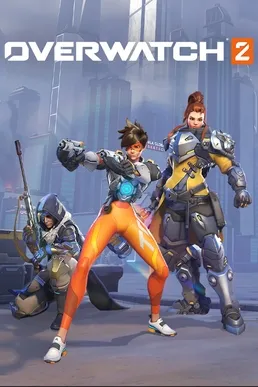
Overwatch 2 is the next evolution of Blizzard’s iconic hero-based shooter, designed to deliver faster matches, deeper strategy, and a more competitive multiplayer experience. Developed by Blizzard Entertainment and published by Activision Blizzard, the game builds on the foundation of Overwatch while introducing major gameplay changes that refresh the formula for modern players. Since its launch, it has attracted millions of players worldwide and remains one of the most talked-about competitive shooters on PC.
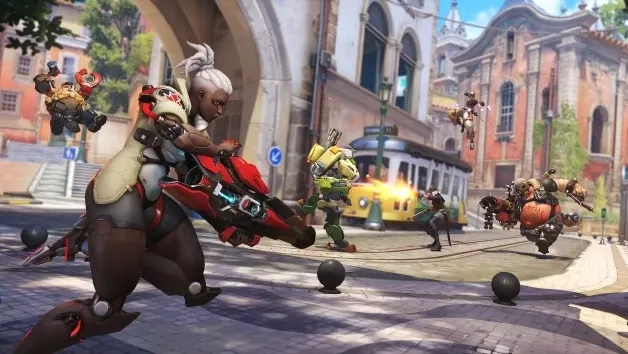
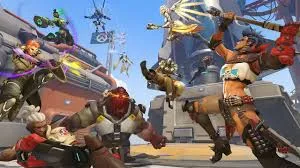
Unlike its predecessor’s 6v6 format, Overwatch 2 shifts to faster 5v5 matches, placing greater emphasis on individual skill, positioning, and team coordination. The game features a large and constantly expanding hero roster, each character offering unique weapons, abilities, and tactical roles. Gameplay focuses on objective-based modes such as push, control, and payload escort, ensuring every match feels dynamic and action-packed rather than repetitive.
On PC, the experience feels especially refined. Smooth performance, precise controls, and customizable settings make it the preferred platform for competitive and casual players alike. With regular seasonal updates, balance patches, and live events, the game continues to evolve. If you’re looking for a modern multiplayer shooter with long-term replay value, a safe download button is available on this page so you can start playing on PC today.
Features
Hero-Based Shooter with Unique Abilities
Overwatch 2 PC is built around a diverse roster of heroes, each equipped with unique weapons, abilities, and ultimate skills. Instead of relying purely on gunplay, success depends on how well you use hero abilities and coordinate with teammates. This system helps new players explore different playstyles and find heroes that match their strengths, whether that’s aiming, strategy, or support.
Faster and More Focused 5v5 Gameplay
One of the biggest changes is the shift from 6v6 to 5v5 matches. With fewer players per team, combat feels faster, clearer, and more impactful. Every player has a stronger influence on the outcome of the match, making positioning, timing, and decision-making more important. New players benefit from less visual clutter and more readable fights.
Clear Role System for Team Balance
Heroes are divided into three roles: Tank, Damage, and Support. Tanks create space and absorb pressure, Damage heroes focus on eliminating enemies, and Support heroes heal and boost allies. This structure teaches teamwork fundamentals and helps beginners understand their responsibilities in each match, reducing confusion and improving coordination.
Objective-Based Game Modes
Overwatch 2 PC focuses on objectives rather than kill counts. Game modes such as Push, Control, and Escort require teams to work together to move objectives or hold key areas. This design encourages strategic thinking and teamwork, teaching new players that winning is about playing the objective, not just getting eliminations.
Expanded and Evolving Hero Roster
The game regularly introduces new heroes, each adding fresh mechanics and strategies. These additions keep gameplay evolving and prevent the meta from becoming stale. For new players, this means there is always something new to learn and experiment with, keeping the experience exciting over time.
Competitive Ranked System
Overwatch 2 PC includes a ranked mode with skill-based matchmaking designed to pair players of similar ability. Competitive play rewards teamwork, consistency, and game sense rather than individual skill alone. Beginners are encouraged to practice in casual modes first, then transition into ranked matches once they feel confident.
Seasonal Updates and Live Content
Each season brings balance changes, new heroes or maps, limited-time modes, and cosmetic rewards. These regular updates keep the game fresh and engaging throughout the year. New players joining later still receive an active, supported experience rather than a stagnant one.
Arcade and Casual Playlists
For players who prefer a relaxed experience, Arcade and unranked modes offer alternative ways to play. These modes are ideal for learning new heroes, practicing mechanics, or enjoying the game without competitive pressure. They are especially helpful for beginners who want to improve at their own pace.
Strong Communication and Team Tools
Built-in voice chat, quick commands, and ping systems allow players to communicate effectively without external software. These tools help new players coordinate with teammates, call out threats, or request support, reinforcing the importance of teamwork in every match.
PC Performance, Precision, and Customization
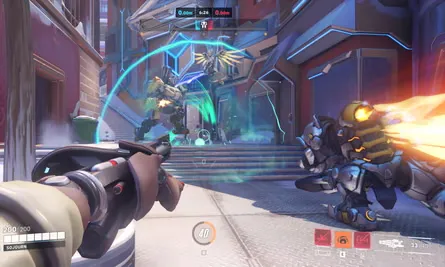
The PC version offers higher frame rates, adjustable graphics settings, and precise keyboard and mouse controls. Players can customize sensitivity, key bindings, and performance options to suit their hardware and playstyle. These features make aiming more accurate, movement smoother, and overall gameplay more responsive, giving PC players a clear advantage in both casual and competitive matches.
How to Download Overwatch 2 on PC?
- Click the Download button on this page to safely get the latest PC build.
- Choose your platform (Windows recommended; Mac/Linux may also be available if listed).
- When prompted, Save the file to an easy location (e.g., Downloads or Desktop).
- If the file is a .zip (or .rar), right-click it and select Extract All… to a new folder.
- Open the extracted folder and double-click
Overwatch 2 PC.exeto launch. - If Windows SmartScreen appears, click More info → Run anyway (only proceed if you downloaded from the button on this page).
- Optional: right-click the .exe and choose Create shortcut to pin it to Start/Desktop.
- In Options/Settings, set fullscreen/windowed, audio levels, and keybinds (WASD/Arrows).
System Requirements
| Component | Minimum Requirements | Recommended Requirements |
|---|---|---|
| OS | Windows 10 (64-bit) | Windows 10 / 11 (64-bit) |
| Processor | Intel Core i3 | Intel Core i5 / Ryzen 5 |
| RAM | 6 GB | 8 GB |
| Graphics | NVIDIA GTX 600 series | NVIDIA GTX 960 or better |
| Storage | 50 GB free space | SSD recommended |
| DirectX | Version 11 | Version 11 |
How to Play Overwatch 2 on PC?
To start playing Overwatch 2 on PC, first ensure the game is properly installed and your system meets the recommended requirements for smooth performance. Keyboard and mouse are the most common control options on PC, offering precise aiming, faster reactions, and better control over hero abilities, though controller support is also available. Begin in the Practice Range or unranked modes to learn basic movement, shooting mechanics, hero abilities, and map layouts without pressure.
As you gain experience, focus on understanding hero roles and teamwork. Choose a role Tank, Damage, or Support that fits your playstyle and complements your team composition. Success depends on positioning, timing abilities and ultimates, and playing objectives rather than chasing eliminations. Use in-game communication tools to coordinate with teammates and switch heroes when needed to counter opponents. On PC, smooth performance and responsive controls make it easier to improve aim, decision-making, and consistency over time.
Why Play Overwatch 2 on PC?
Playing Overwatch 2 on PC offers the most responsive and competitive experience available. Keyboard and mouse controls provide superior aiming precision and faster reaction times, which are essential in a fast-paced hero shooter where ability timing and accuracy can decide entire matches. Higher frame rates and adjustable graphics settings also improve visibility, helping players track enemies, ultimates, and objectives more clearly during intense team fights.
Another major advantage of the PC version is flexibility and comfort. Players can enjoy longer gaming sessions without battery drain, customize controls and sensitivity to match their playstyle, and multitask easily between matches. Larger displays improve map awareness and positioning, while performance customization ensures smooth gameplay on a wide range of systems. For players who value precision, performance, and competitive balance, PC is the best way to experience Overwatch 2.
FAQs
Is Overwatch 2 PC completely free to play?
Yes, Overwatch 2 on PC follows a free-to-play model. Players can access all core multiplayer modes without paying upfront. Optional cosmetic items, battle passes, and seasonal content are available for purchase, but they do not affect gameplay balance, making the experience fair for all players.
Can new players easily learn Overwatch 2 on PC?
Absolutely. Overwatch 2 includes tutorials, practice ranges, and casual game modes designed to help new players learn hero abilities, map objectives, and team roles. The improved user interface and clearer role system make it easier for beginners to understand the game mechanics.
Does Overwatch 2 PC support keyboard and mouse controls?
Yes, keyboard and mouse controls are fully supported and are the preferred input method for most PC players. They provide better aiming precision, faster reactions, and more control during intense competitive matches.
Is Overwatch 2 PC suitable for competitive gaming?
Yes, the PC version is highly competitive, offering ranked modes, skill-based matchmaking, and regular balance updates. It is also the main platform for high-level competitive play and esports events.
Is there a safe way to download Overwatch 2 for PC?
Yes, a secure download button is available on this page, allowing users to safely download and install the PC version without any risk.
Conclusion
Overwatch 2 PC delivers a refined hero-based shooter experience with faster 5v5 matches, diverse heroes, and objective-driven gameplay. Its free-to-play model, regular updates, and strong competitive focus make it appealing to both new and experienced players. The PC version stands out with precise controls, smooth performance, and full customization options for optimal gameplay. If you’re ready to jump into action-packed team battles and evolving competitive modes, use the download button available in this article and start playing Overwatch 2 on PC today.